
Overview
Manufacturing companies often rely on QuickBooks Desktop Enterprise for years to manage accounting, inventory, and operational workflows. As transaction volumes grow, however, QuickBooks files can become extremely large and inefficient, leading to performance issues, database errors, and operational slowdowns.
This company experienced this exact challenge. After more than a decade of growth, their QuickBooks file had expanded into a multi-gigabyte database containing millions of transaction lines.
The Challenge
Massive QuickBooks File Slowing Operations: Years of continuous usage caused the company’s QuickBooks file to grow significantly:
- File size: 3.4 GB
- Key Data Volume: 797,000 transactions / 8,000,000 targets
As the file grew, performance degraded across daily operations. Users experienced:
- Slow report generation
- Lag when processing transactions
- Increased database errors
- Negative inventory warnings
- Risk of file corruption
Without intervention, these issues would worsen as the company continued to scale.
Non-Posting Transactions Creating Database Weight: One of the largest contributors to file size was the accumulation of non-posting transactions, including sales orders, estimates, and purchase orders. These culminated in:
- 7 million sales-order lines
- 30,000+ closed purchase orders
- Extensive audit-trail data
These transactions do not affect the general ledger but can dramatically increase file size and slow database performance.
Migration to QuickBooks Online Was Not Feasible: The company initially explored migrating to QuickBooks Online to enable remote access. However, this option presented several barriers:
- QuickBooks Online migration limit of approximately 1 GB
- Large inventory and manufacturing workflows not supported as effectively
- Significant retraining costs and operational disruption
A full ERP replacement was also considered but estimated to cost tens of thousands of dollars and require months of implementation. Instead, the company needed a way to optimize their existing QuickBooks environment.
The Solution
Fourlane implemented a multi-phase optimization strategy focused on restoring file health, reducing file size, and introducing a scalable system architecture.

Phase 1: Comprehensive File Review
Fourlane began with a detailed QuickBooks file analysis, evaluating transaction volume, targets, error logs, non-posting transactions, audit trail size, data fragmentation, and list structures. This diagnostic process identified the primary drivers of file bloat and informed the optimization approach.
Phase 2: Initial Cleanup & Optimization Attempt
Targeted cleanup efforts began with a focus on removing non-posting transactions, including closed sales orders, estimates, and completed purchase orders. For this company, over 218,000 closed sales orders were identified for phased deletion to minimize disruption.
Additional steps included reviewing inactive customers and vendors, outdated inventory, unused integrations, and excessive audit trail data. However, due to the sheer volume of historical transactions, the cleanup process proved extremely slow and inefficient.
Strategic Pivot: New File Implementation
Given the limitations of optimizing the existing file, Fourlane partnered with the client to shift strategy. After extensive discussions around workflows and operational needs, the decision was made to implement a new QuickBooks file.
Fourlane developed and executed a structured project plan that included system design, new file setup, and team training. This approach provided a clean, scalable environment and eliminated the performance constraints of the legacy file.
Key Results
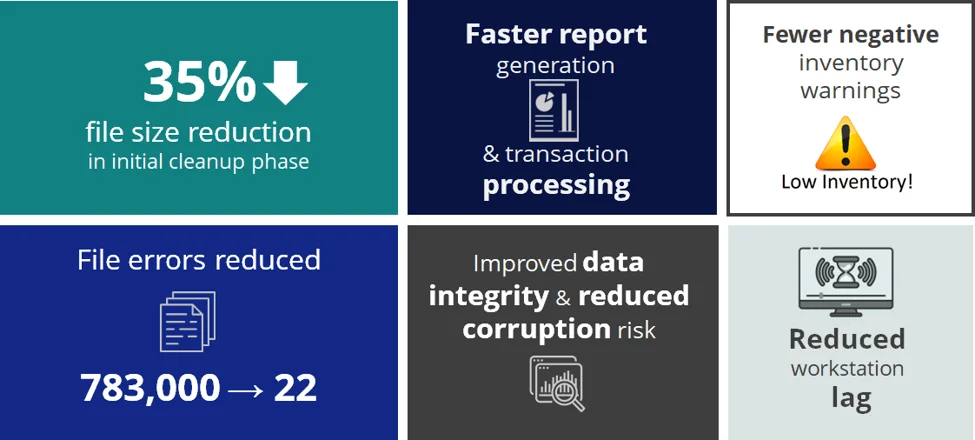
Conclusion
For manufacturing companies with large QuickBooks files, system performance issues are often caused by years of accumulated transactions, audit-trail bloat, and inefficient workflows – not necessarily by limitations of QuickBooks itself.
Through strategic file optimization and database repair, this company transformed its QuickBooks environment from a slow, error-prone system into a faster, more stable platform capable of supporting continued growth.
Is Your QuickBooks File Slowing Down Your Business?
Large QuickBooks company files can lead to slow performance, database errors, reporting delays, and increased risk of file corruption. The good news is that many of these issues can be resolved without replacing your accounting system.
Contact Fourlane to schedule a comprehensive QuickBooks file review and discover opportunities to improve performance, reduce file size, and restore stability to your QuickBooks environment.
- Identify file bloat, corruption risks, and performance bottlenecks
- Review audit trail, inventory, and transaction history issues
- Evaluate cleanup, optimization, and file rebuild strategies
- Get expert guidance from QuickBooks Enterprise specialists