
QuickBooks Online vs QuickBooks Desktop
Which QuickBooks is right for your business
It can be confusing to decide which version of QuickBooks to choose. Today we'll take a look at QuickBooks Online vs QuickBooks Desktop Enterprise - two of Intuit's most popular products. We'll dive into what features you can expect from each piece of software, the differences between them, and how to make your ultimate decision!
Getting the Right QuickBooks Product For Your Business
QuickBooks is one of the most popular choices for accounting software among companies big and small. The question is no longer whether QuickBooks is a good choice for your company. It has now come down to deciding which version QuickBooks software is best for your business. Therein lies the age-old debate: QuickBooks Online vs QuickBooks Desktop.
Every business does not have the same needs, wants, or capabilities. The accounting software a company chooses needs to be able to work for those using it and scale with the growth of the company. This is what makes software selection such a vital step in a company’s overall financial management journey. For many, the desktop version offers maximum control, while others find that QuickBooks online offers them the internet connection freedom they require.
Join us to compare QuickBooks Online, explore, and discover each version as we delve into the difference between QuickBooks Online vs QuickBooks Desktop (Enterprise). From accounts payable functionality to expense tracking, you’ll get a full picture of each product’s capabilities.

Join us to compare, explore, and discover each version as we delve into the difference between QuickBooks Online vs QuickBooks Desktop (Enterprise).
At a Glance
QuickBooks Online
- Cloud-based software
- Perfect for small businesses
- Access through your browser
- Available for up to 25 users
- SaaS product
- No installation required
- Automatic updates
QuickBooks Desktop
- Desktop-based product
- On the market since 2002
- Can handle a large volume of data
- Advanced reporting options
- Does sync with the cloud
- Available for up to 40 users
Benefits of QuickBooks Desktop (Enterprise)
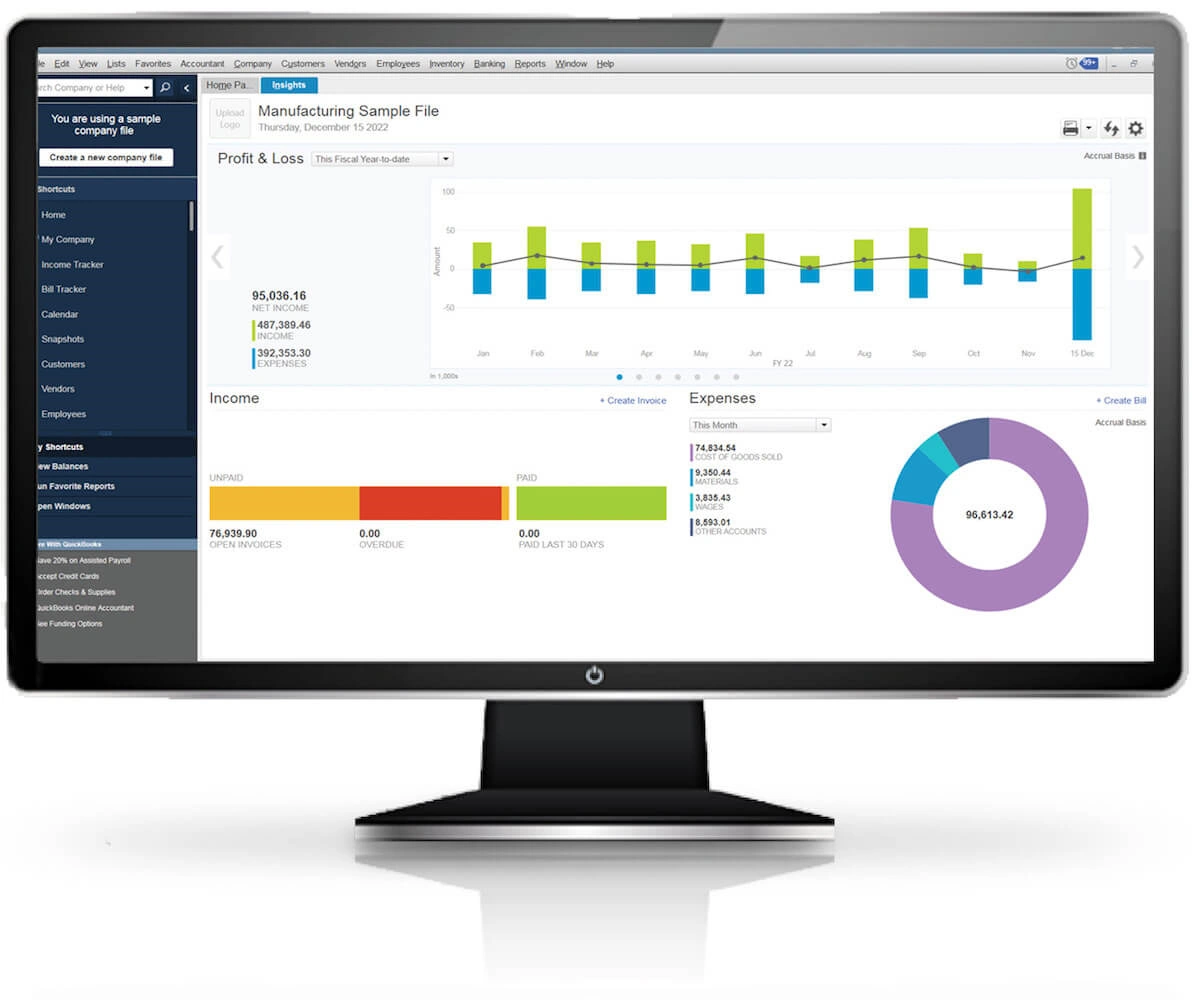
QuickBooks Desktop Enterprise is, in our opinion, the most powerful financial software on the market at its price point. It has been on the market since 2002 and has added features and functionality every year since. It can handle a large volume of data and has advanced reporting options that give users more flexibility. Many users find these robust reports especially beneficial when managing accounts payable tasks.
QuickBooks Enterprise is a desktop-based product. This means you download and install the product and can host it locally on your own servers. Many businesses, particularly those who deal with personally identifiable information (PII), prefer this extra layer of security. Designed for on-premise, QuickBooks Desktop, can help organizations that must maintain strict data controls and ensure they meet compliance requirements.
QuickBooks Enterprise does sync with the cloud but is accessed from your computer’s desktop and is available offline or behind a firewall. The product is also available for up to 30 users (some QuickBooks Desktop users find this extremely beneficial), so it is a good choice for a larger business where more employees need access to QuickBooks’s internal system all at once. This version also gives you the flexibility to integrate features that cater to unique business types, including additional time tracking functionalities and advanced inventory modules.
Benefits of QuickBooks Online
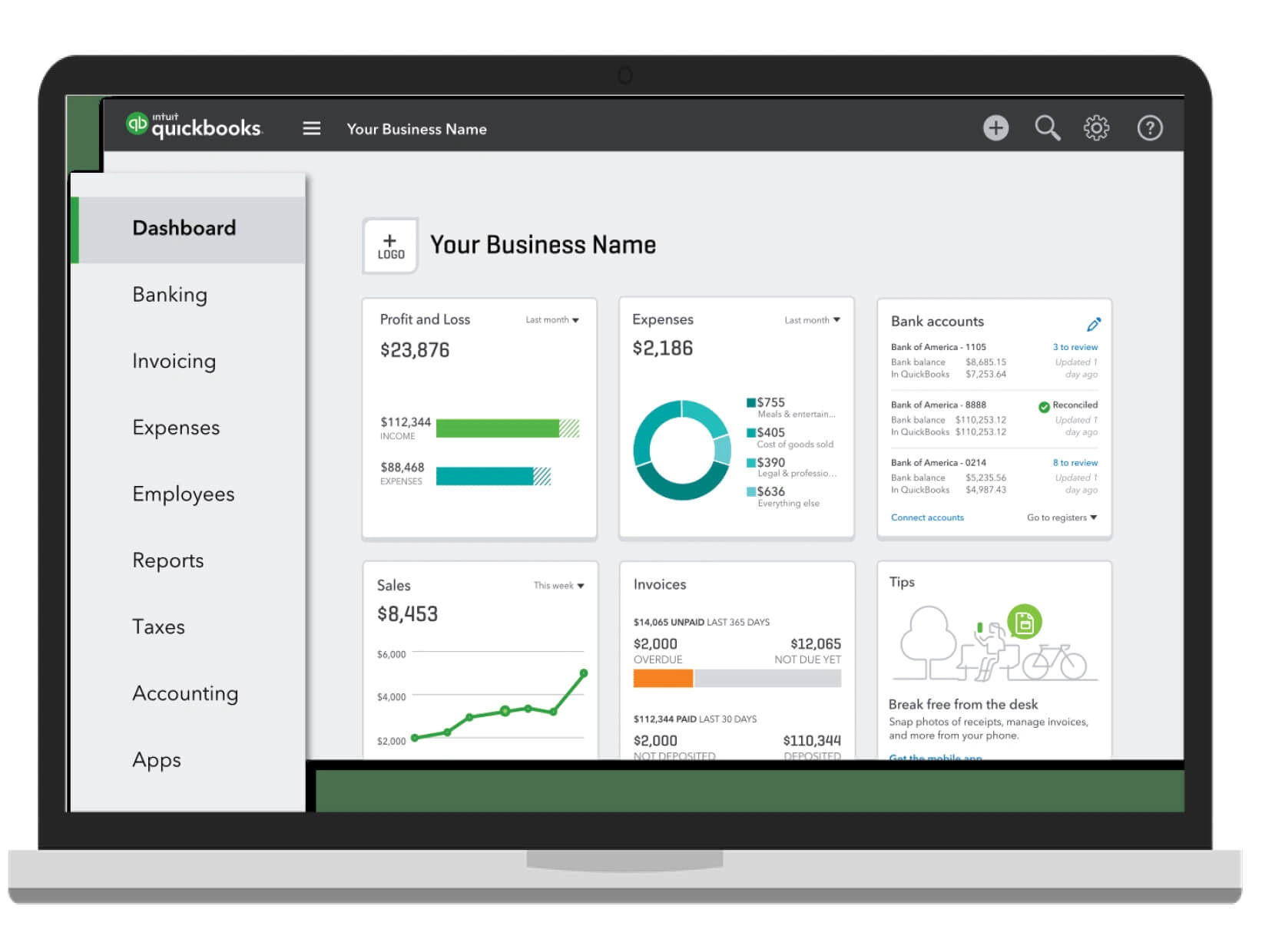
QuickBooks Online is a cloud-based software optimized for small businesses. As a QuickBooks Online user, you will access QBO through your browser by going to a website where you log on to do business. It is available for up to 5 users at a monthly or annual cost. As your team grows, you can inquire about QuickBooks online offers that accommodate multiple users with an additional fee user plan if needed.
Because QuickBooks Online is a SaaS product, that means you have access anywhere, anytime, including on your phone. QuickBooks Online mobile functionality allows you to send invoices on the go and even handle expense tracking directly from a handheld device. You don’t need to install any software, and updates are automatic with no need to download a package.
QuickBooks Online can be a great option for small businesses and companies with only a few employees. It has many of the same features as Enterprise at a fairly low, monthly cost. This online version also keeps you connected with your team through real time collaboration, making it easy to check up on accounts payable and other tasks wherever you have an internet connection.
Features Comparison: Quickbooks Online vs QuickBooks Desktop Enterprise
Winner!
QuickBooks Online is a cloud-based product, which means it is accessed in your browser at a web address. It also has an associated mobile app for Apple and Android. This anytime, anywhere access is ideal for a small business, or a business-on-the-go that needs to perform accounting functions on multiple devices or while traveling. Whether you’re using QuickBooks online mobile solutions to check accounts payable or track sales, you’ll appreciate the convenience of not being tied to a single machine.
Access Anywhere

You can host QuickBooks Enterprise on the cloud, but that requires additional hosting setup. It is most commonly deployed as on-premise software, with one license accessible on one machine. This provides the highest level of security from hacking and fraud, but it does mean you won’t be sending invoices from your phone or tablet. Still, QuickBooks Desktop can be perfectly suited for businesses who want control of every aspect of their data.
QuickBooks Online comes with 65 built-in reports. These reports focus on the Dashboard view and gauging your day-to-day financials. Since QuickBooks Online is a more lightweight product the reports don’t dive as deep into things like job costing, business health, or financial projections.
Reporting & Analytics
Winner!
QuickBooks Enterprise comes with 150+ out-of-the-box reports, including industry specific reports for the Contractor, Non-Profit, and Manufacturing Editions. With this software you can also easily build add-on and custom reports to drill deeper into your business.
QuickBooks Online is great for basic inventory management. You can manage a limited number of inventory items and easily create purchase and sales orders which automatically add to, or deduct from, your inventory. You can also create trigger alerts for when you need to reorder an item. But you can’t do much more than that!
Inventory Management
Winner!
Right off the bat, QuickBooks Enterprise has the capability to hold more inventory items—up to 100,000 which is enough for even most enterprise-level businesses. It also allows more flexibility in how you track and manage that inventory. You can add images of your inventory items. You can perform bin location tracking, serial number location tracking, and sync your QuickBooks Enterprise to a barcode scanner so your warehouse team can easily monitor what’s in stock. This advanced inventory capability benefits companies that need industry- or specific editions to handle complex stock workflows.
Draw
One of the best features about QuickBooks Online is the ability to send invoices from your phone. When it comes to QuickBooks Enterprise vs. QuickBooks Online, they both have great (but different) invoicing capabilities.
Invoicing
Draw
QuickBooks Enterprise has one amazing feature that QuickBooks Online doesn’t have when it comes to invoicing: batch invoicing. You can send out multiple invoices at once with the click of a button. This feature is very convenient, particularly if you invoice certain clients once a month.
Most QuickBooks Online support is based overseas. For the U.S.-based reps they do have, they are often newer employees and rookies. QuickBooks also tries to promote a DIY attitude and will typically push you towards their knowledge base before connecting you with a live human, this can be frustrating when your product is not working correctly.
Tech Support
Winner!
Every QuickBooks Enterprise user will have a dedicated Customer Service Manager who will be your point-person at Intuit for support concerns. These are coveted, highly technical positions. If you have a number of users, or are a quickly growing company, you will be promoted to the Priority Circle which gives an even better level of support.
QuickBooks Functionality Comparison
On functionality, Quickbooks Enterprise will win every time. QuickBooks Online has the edge in accessibility but Enterprise has more features. The features of Enterprise are more robust and customizable. As a cloud-based product, it is meant for businesses on the go.
| Intuit Enterprise Suite Platform | QuickBooks Online Advanced* | QuickBooks Desktop Enterprise** | |
| Entities and users | |||
| Entities included | 1 (then pay per entity up to 200) | 1 | 3 (With Time and Payroll) |
| Users included | 1 admin user 6 standard users* 3 accountant seats Unlimited report users *Pay per user per additional admin and standard users up to 500 | 25 3 accountant seats Unlimited report users | Pay per user (max 40) |
| Financial management | |||
| Revenue recognition by milestone | ✓ | — | Limited No revenue recognition |
| Multi-entity management Intercompany transactions, parent/child hierarchy, standardized chart of accounts (COA), multi-entity user management | ✓ | — | Limited No standardized COA or multi-entity user management |
| Intercompany eliminations | ✓ | — | ✓ |
| Accept payments, Process credit card and ACH payments | ✓ | ✓* with QuickBooks Payments | ✓* with QuickBooks Payments |
| Pay bills, Send bill payments, with ACH or check | ✓* | ✓* with QuickBooks Bill Pay | ✓* with Bill Pay powered by Melio |
| Sales workflow automation Create rules for sales forms that trigger approval, email, task, or reminder | ✓ | — | — |
| Expense workflow automation Create rules for expense forms that trigger an approval, email, task, or reminder | ✓ | 1 dimension | Limited PO and Bills only |
| Business insights & reporting | |||
| Multi-dimensional reporting: Create and track key metrics to compare revenue streams | Up to 20 dimensions | — | 1 dimension |
| Data analytics with smart recommendations; AI-powered insights, predictions, and recommendations | ✓ | — | — |
| Budget & forecast workflow automationCreate rules for budgets/forecasts that trigger an approval, email, task, or reminder | ✓ | — | — |
| Manage your team | |||
| Benefits, HR, & employee management Intercompany transactions, parent/child hierarchy, standardized COA, multi-entity user management | ✓ Customer can opt in | ✓ with QuickBooks Elite Payroll | Limited 401k with Guideline |
| Time tracking, payroll & tax filingSchedule shifts, clock in and out, paycheck creation, direct deposit, quarterly/yearly filings | ✓ Customer can opt in | ✓ with QuickBooks Elite Payroll | ✓ |
| Manage your projects | |||
| Project execution; Track project progress and actual income/ expenses + project manager role | ✓ | Limited no project manager role | Limited no project manager role |
| Project monitoring; Compare estimates to actuals, project reports, change orders | ✓ more project reports | Limited no change orders, committed cost, cost to complete | ✓ |
| Projects workflow automation; Create rules for projects that trigger an approval, email, task, or reminder | ✓ | — | — |
| Project data analytics with smart recommendations; Create rules for projects that trigger an approval, email, task, or reminder | ✓ | — | — |
| Get more customers | |||
| Marketing CRM; Customer profiles, audience segmentation, tags, and demographics | ✓ Customer can opt in | ✓* with Mailchimp Premium | — |
| Email marketing; Build content and campaigns, schedule emails | ✓ Customer can opt in | ✓* with Mailchimp Premium | — |
| Website builder; Create and customize your own website domain | ✓ Customer can opt in | ✓* with Mailchimp Premium | — |
| Marketing insights and testingGet insights on what is working and A/B test to try new messaging | ✓ Customer can opt in | ✓* with Mailchimp Premium | — |
**QuickBooks Desktop Enterprise configuration includes Diamond subscription, Assisted Payroll and Time Elite.
Which Quickbooks is right for you? Our opinion
QuickBooks Online is great starter software for a business with fewer than 5 employees. It is a great way to get up and running, start tracking accounting data, and may better decisions. Once you’ve hit your stride and are growing, we really recommend QuickBooks Enterprise. It is built for larger businesses and can intake more data, run more (and better) reports, and is more customizable.
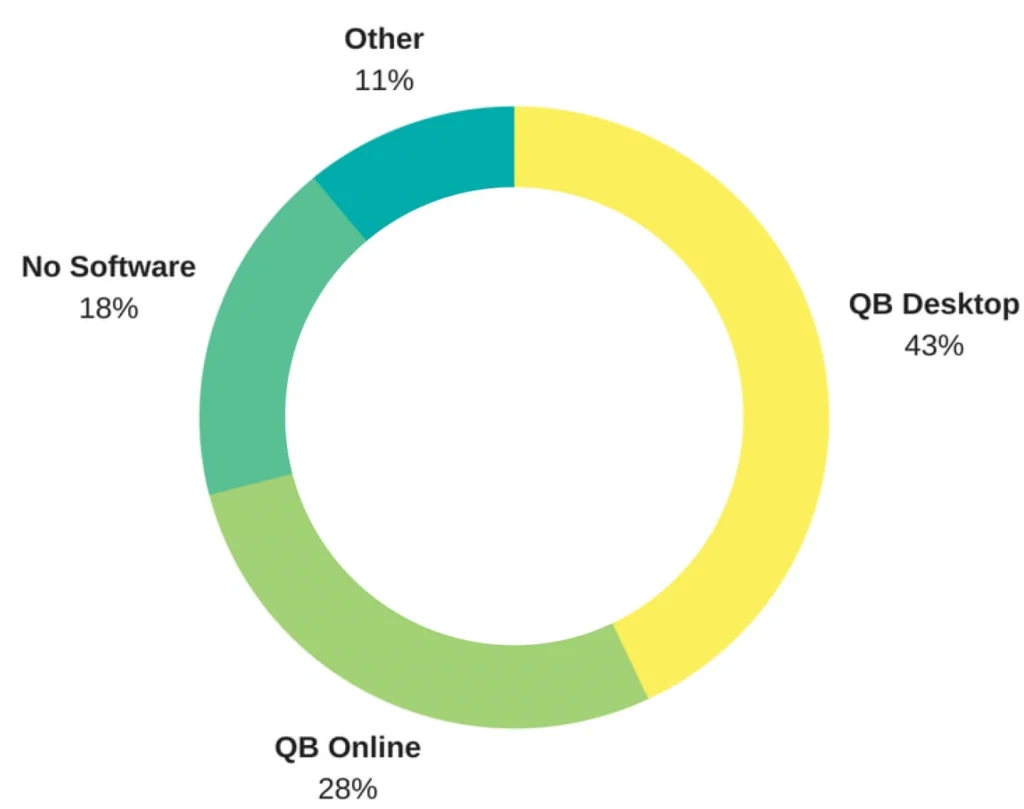
On the left you can see the market penetration of both products in the small business segment. Both are widely used and a massive step up from the 18% of small business owners who use no accounting software.
If you want to learn more, you can read about each of the products on our dedicated landing pages.
Join thousands of businesses who trust Fourlane with their books
Whether you’re currently using QuickBooks and need professional consulting services, are looking to buy QuickBooks or even outgrowing QuickBooks, we can help.