

Running a thriving company takes more than selling products or delivering services-it requires a clear, accurate view of your finances. But what if the way you record revenue and expenses could change not just your numbers, but also your tax bill? According to Forbes, “You will need to determine the best bookkeeping methods and ensure your business model meets government requirements. For instance, certain businesses cannot use cash-basis accounting because of the Tax Reform Act of 1986.”[i] Choosing between cash and accrual accounting in QuickBooks might be the single decision that determines whether you see profit or loss at year-end.
Whether you manage a growing e-commerce shop or oversee the books for a local service firm, understanding how each method recognizes income and expenses is essential. Under a cash basis, revenue hits your profit and loss only when money actually changes hands; invoices and bills sit idle until the payment clears, keeping those dollars off your statements until they’re truly received or paid. Accrual accounting, on the other hand, records income the moment you issue an invoice and captures expenses as soon as you enter a bill, offering a more complete snapshot of performance over any period. With so much riding on the timing of these entries – from cash flow planning to quarterly tax estimates – grasping the difference isn’t just bookkeeping trivia; it’s a strategic necessity for every QuickBooks user.
Understanding Cash and Accrual Accounting in QuickBooks
Accurate bookkeeping starts with knowing exactly when to record each dollar that enters or leaves your business. Under the cash method, revenue and expenses hit your Profit & Loss only after money actually moves-when customers pay or you cut a check-so unpaid invoices and open bills stay off the books until they’re settled.
A QuickBooks training resource explains that accrual accounting does the opposite: income is posted the moment you create an invoice, and expenses appear as soon as you enter a vendor bill. This timing difference paints a fuller picture of how much you’ve truly earned or spent within a month, quarter, or fiscal year-even if the cash hasn’t landed in your bank yet.
For owners and financial managers, the choice between these methods directly affects cash-flow planning, loan applications, and tax liabilities. By aligning recognition with your operational reality, you’ll avoid late-night surprises when reconciling accounts or preparing returns.
Before diving into the mechanics, here’s a side-by-side look at how QuickBooks treats each approach:
| Cash Basis | Accrual Basis | |
| Income | Revenue appears only after you record customer payments. | Revenue posts when you create an invoice, regardless of when it’s paid. |
| Expenses | Costs show up when you actually disburse funds. | Costs post when you enter the bill, even if you’ll pay it later. |
| Profit & Loss Timing | Mirrors real-time bank activity, ideal for monitoring liquidity. | Matches income and expenses to the periods they belong, supporting deeper performance analysis. |
| Tax Impact | Taxable income is generally lower if receivables arrive after year-end. | Offers consistency for businesses with inventory, long projects, or complex billing cycles. |
How Cash Basis Accounting Works in QuickBooks
When you choose the cash basis in QuickBooks, every transaction waits for one trigger: payment. Here’s what that looks like in practice:
- Create an invoice for a customer.
- No income is recognized yet; the amount sits in Accounts Receivable.
- Record a customer payment-QuickBooks immediately posts the revenue to your Profit & Loss.
- Enter a bill from a vendor. Again, nothing hits expenses until you record the actual bill payment.
- Pay the bill, and QuickBooks books the expense on that payment date.
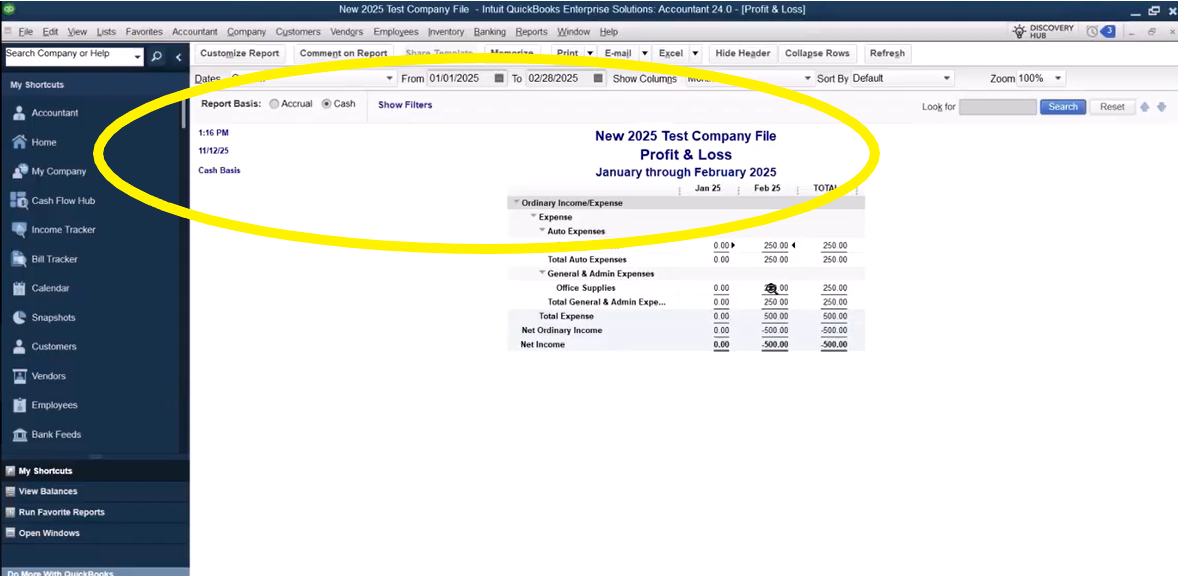
Consider a downtown law firm that prefers simplicity. Attorneys send invoices at month-end and enter office supply bills only when they write checks. Because these lawyers recognize fee income when clients pay, the firm’s monthly P&L mirrors its bank balance, a setup often favored by small service businesses that rely on steady cash flow.
How Accrual Basis Accounting Works in QuickBooks
Switch QuickBooks to accrual, and the emphasis shifts from cash movements to economic events:
- Create an invoice-income is posted immediately, boosting revenue even if payment arrives weeks later.
- Enter a vendor bill-expense records right away, giving you visibility into upcoming obligations.
- Receipt of customer payment merely reduces Accounts Receivable; paying the bill clears Accounts Payable.
- Reports show both earned but unpaid revenue and incurred but unpaid costs, offering a forward-looking view of profitability and obligations.
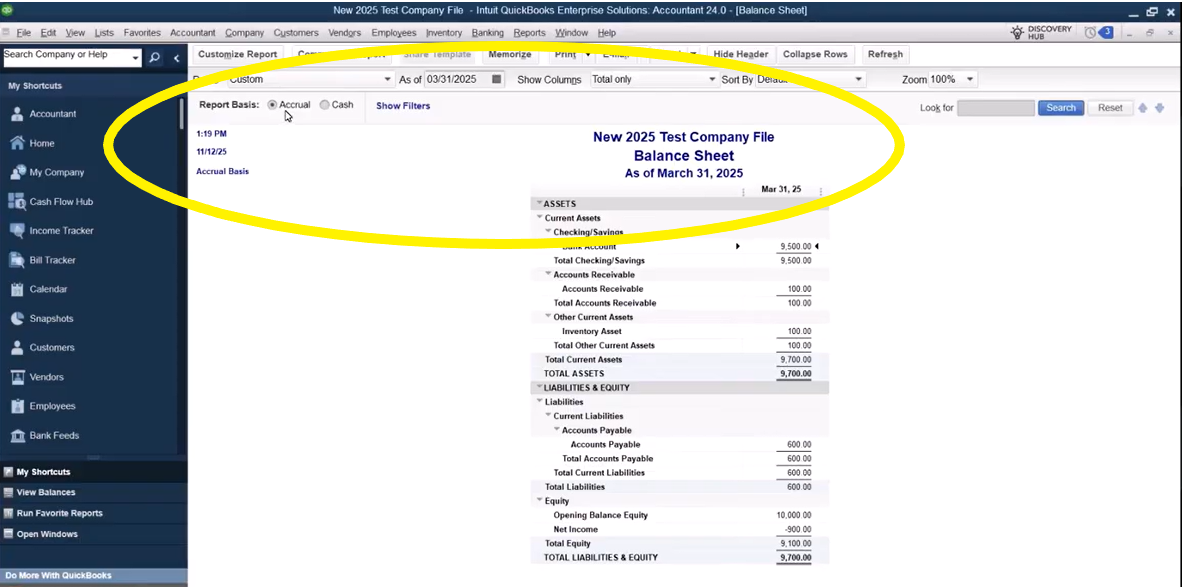
Retailers, wholesalers, and manufacturers that track inventory-or construction companies that take sizable customer deposits – generally thrive on accrual accounting because it aligns sales, cost of goods sold, and stock movements in the same period, as noted by businesses that carry inventory or collect deposits often turning to the accrual method. In QuickBooks, this ensures inventory purchases hit Cost of Goods Sold and revenue in sync, giving management – and lenders – a realistic assessment of margins and cash needs.
How QuickBooks Handles Reporting Preferences and Special Scenarios
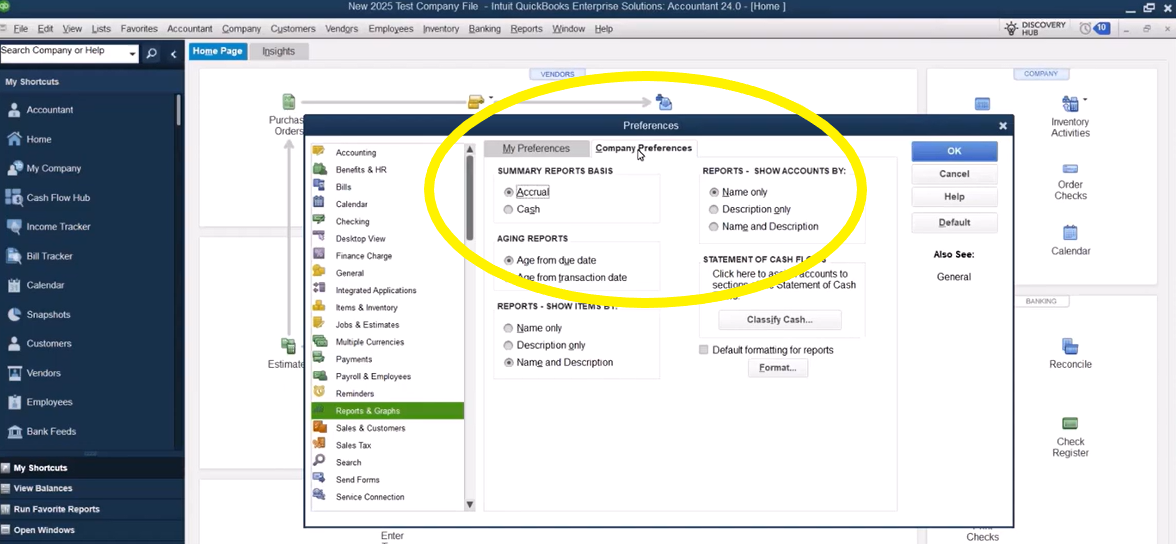
Before any numbers hit your financial statements, QuickBooks asks you to choose a default reporting style. In Company Preferences, the Reports & Graphs tab lets you set cash or accrual as the system’s baseline. Whichever option you pick determines how every new report loads when you first open it. If you ever need the other view-say, to send your CPA cash-basis statements while you manage operations on accrual – you can flip a single report’s basis with one click, no permanent change required.
QuickBooks makes most cash-versus-accrual toggles seamless, yet certain transactions can still surprise even seasoned users. Keep an eye on these situations where what you see might not be what you expect:
- Partial customer or vendor payments: When you pay only part of a bill or receive a deposit on an invoice, QuickBooks allocates the payment proportionally across all lines. This can distort which income or expense accounts appear on cash-basis reports until the balance is fully settled.
- Inventory purchases on bills: Recording stock on a vendor bill posts to both Accounts Payable and Inventory (a balance-sheet account). Even in cash view, that A/P may still show because its offset is another balance-sheet line, not an expense.
- Sales tax payable: Like inventory, sales-tax liability lives on the balance sheet. If you run cash-basis statements before remitting sales tax collected, the liability can surface alongside cash-only figures.
- Bypassing AR/AP workflows: Businesses that record deposits directly to revenue or write checks instead of entering bills won’t see much difference between cash and accrual reports, because those transactions never touch Accounts Receivable or Payable at all.
These examples illustrate why toggling report bases is only half the battle; understanding the underlying data flow ensures you don’t misread the story your books are telling.
Common QuickBooks Reporting Pitfalls and Nuances
Even with clean data, users often stumble over a few recurring issues. Keep these in mind as you switch between accounting methods:
- Accounts Payable on a “cash” balance sheet – This usually appears when a bill’s offset posts to another balance-sheet account (such as Inventory). QuickBooks still displays the payable because both sides of the entry stay on the balance sheet rather than hitting an expense.
- Mismatched Profit & Loss totals – Partial payments can leave revenue or expense lines understated, causing confusion when monthly results suddenly jump after a final payment clears.
- Journal entries that ignore the basis – Manual journal entries post immediately, so they show on both cash and accrual reports regardless of payment timing.
- Commission calculations – If you pay reps only after invoices are settled, running commission reports on accrual can overstate earnings. Switch those reports to cash to ensure payouts match collected funds.
- Missing A/R aging details – Skipping invoice creation may keep things simple, but it also strips you of visibility into outstanding receivables, making accrual-based cash-flow forecasts nearly impossible.
Practical tips for smoother reporting:
- When in doubt, duplicate key reports and view them in both bases to spot timing differences.
- Use clear naming conventions for journal entries so you can trace why certain figures appear on cash reports.
- Reconcile A/P and A/R regularly to prevent old balances from cluttering cash-basis statements.
- Review inventory and sales-tax accounts to ensure balances make sense in both views.
Choosing the Right Accounting Method for Your Business
Selecting cash or accrual isn’t merely a bookkeeping preference – it’s a strategic choice that influences everything from tax liabilities to how confidently you forecast growth. Start by weighing the size of your operation, the complexity of your workflows, and any regulatory requirements. Companies with straightforward, pay-as-you-go transactions often value the simplicity of cash reporting, while those juggling inventory, long projects, or outside investors typically lean toward accrual for its deeper insights.
Here are the key factors to keep on your radar:
- Tax considerations and IRS thresholds for inventory-holding entities.
- The need for real-time cash-flow visibility versus comprehensive performance tracking.
- How frequently you invoice customers or carry outstanding bills.
- External requirements from lenders, investors, or franchisors that may mandate accrual statements.
- Your internal resources-time, staff expertise, and systems-to support added complexity.
Below is a detailed look at which businesses tend to benefit most from each method.
| Cash Basis suits: | Accrual Basis suits: |
| · Solo entrepreneurs and microbusinesses with minimal receivables or payables. · Professional service firms-think salons, landscapers, or law practices-where revenue is typically recognized when clients pay, as described by a QuickBooks training provider.
| · Businesses that hold inventory, accept sizable customer deposits, or operate in manufacturing, retail, or construction; these companies need to align costs and revenue in the same period, according to guidance from a QuickBooks training resource. · Firms seeking external financing or investors who rely on GAAP-compliant statements.
|
Making the call may feel daunting but remember that QuickBooks lets you switch report views at any time-so you can file taxes on cash while analyzing performance on accrual. Still, changing your official accounting method with the IRS requires careful planning and may impact prior-year filings, so don’t do it alone.
When to Seek Professional Help with QuickBooks
Sometimes, the smartest move is calling in reinforcements. Partnering with QuickBooks specialists can:
- Uncover compliance red flags before the IRS or state agencies do.
- Design workflows that scale as you add products, warehouses, or new revenue streams.
- Integrate QuickBooks with point-of-sale, e-commerce, or ERP systems for a seamless data flow.
- Provide customized training so your team records transactions correctly-no matter which accounting method you adopt.
Here at Fourlane, we bridge the gap between accounting best practices and the technical nuances of QuickBooks. Our team can evaluate your current setup, recommend the ideal reporting method, and configure your file so you can focus on growing the business with confidence.
Empower Your Business with the Right Accounting Method in QuickBooks
Choosing between cash and accrual accounting isn’t just a compliance checkbox-it’s the lens through which you view your company’s health. The right method helps you anticipate cash-flow needs, uncover profit drivers, and present reliable numbers to banks, investors, and tax authorities. When your reporting aligns with your operations, you spend less time untangling transactions and more time making strategic decisions that propel growth.
Ready to put the ideal accounting method to work in your QuickBooks file? Reach out to the experts who’ve guided thousands of businesses through this very decision. Contact Fourlane today to get personalized advice, seamless implementation, and ongoing support tailored to your goals.
[i]Forbes (2024). Cash Vs. Accrual Accounting: What’s The Difference?. Cash Vs. Accrual Accounting: What’s The Difference? – Forbes Advisor