


The way you access QuickBooks Enterprise has a direct impact on how quickly your team can react to changing business conditions. When company files sit on a local server, every edit, report refresh or year-end adjustment is tied to the physical location of that machine. In contrast, cloud hosting for QuickBooks makes your books available any time your staff has an internet connection, turning geography into a non-issue and keeping projects moving even when everyone is working from different ZIP codes. That kind of secure remote access is exactly why so many accounting firms and growing businesses are comparing traditional on-premise servers with specialized QuickBooks hosting providers.
This guide breaks down what moving to a QuickBooks hosting provider really means for small, mid-market and enterprise-grade organizations and, more importantly, how to decide whether the switch aligns with your goals, workflows and budget. By the end, you’ll have a clear framework for weighing the benefits, total cost of ownership, security compliance considerations and disaster-recovery advantages of hosted QuickBooks – and you’ll know exactly where to get help if you need it.
What Is QuickBooks Hosting?
When your accounting data lives in the cloud, collaboration no longer stops at the office door. In a recent webinar, we described how “team members in different cities or states all accessing the QuickBooks company file at the same time” can stay synchronized, which eliminates the lag that occurs when files have to be emailed back and forth. The session also highlighted how real-time visibility lets accountants, managers and owners spot issues and finalize statements without waiting for someone else to release the file, a game-changer during busy periods such as tax season.

Cloud hosting QuickBooks removes the hardware barrier that often slows growing businesses and keeps multi-user collaboration smooth. Here’s a quick look at the freedom you gain once your books move off a local server and into a managed application-hosting environment:
- Access from any modern web browser, whether you prefer Chrome, Firefox, Safari or Edge
- No VPN required to open hosted QuickBooks from a Windows PC, macOS laptop or Linux workstation
- Automatic session encryption and multi-factor authentication that protect credentials on public Wi-Fi networks
- Consistent, real-time performance regardless of device type, so a tablet in a warehouse loads reports just as quickly as a desktop in the back office
- Built-in scalability that lets you add new users, versions of QuickBooks or additional hosting services without buying new hardware
As you weigh these accessibility perks, remember that flexibility isn’t just about where you log in, it also involved the number of versions of QuickBooks utilized by the company.
Understanding Technical Flexibility and Version Control
Running several editions of QuickBooks Desktop simultaneously is almost impossible on a single workstation, but QuickBooks cloud hosting removes that limitation. As explained in our guidance on using multiple QuickBooks versions in a hosted environment, organizations can open a 2023 company file right next to a 2024 file without juggling installs or risking file corruption. That flexibility benefits firms that still need historical copies for audits, legacy projects or clients on older builds while their internal team upgrades to the latest release.
A reputable QuickBooks hosting provider also takes the headache out of patch management. In our webinar, we noted that “the hosted setup is that they will work to handle any kind of software update… to ensure that everyone is up and running on the same version.” When updates are applied once at the server level, no one on your staff needs to babysit install wizards or worry about mismatched release numbers. Centralized updates also help maintain security compliance by closing known vulnerabilities as soon as Intuit issues a fix.
Finally, hosting solutions allow you to test new features, integrated apps and plug-ins in a sandbox before they touch live financial data. Whether you’re piloting a new inventory module, migrating to QuickBooks Online or evaluating enterprise QuickBooks add-ons, hosted environments give you a safe playground.
With version control squared away, the next logical question is where those QuickBooks files actually live and who shares server resources – an architectural choice that directly affects data security, performance and overall cost effectiveness.
Comparing Hosting Architectures: Shared vs. Dedicated Servers
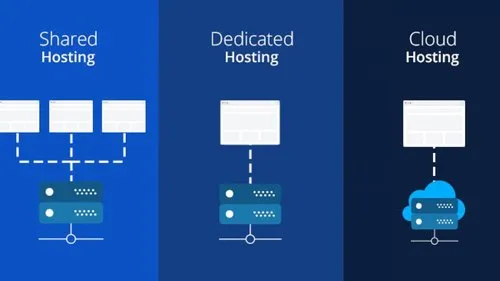
Every hosting arrangement ultimately boils down to one architectural choice: will your QuickBooks files reside on a shared server or a dedicated one?
Shared Servers
On a shared server, multiple companies tap the same pool of resources. The upside is straightforward – lower monthly fees and attractive hosting offers because infrastructure costs are distributed across many tenants. The trade-off is that peak-hour traffic from another organization can siphon CPU or memory away from your session, potentially slowing large reports, complex imports or enterprise-grade consolidation routines.
Dedicated Servers
A dedicated server flips those dynamics. All compute power, bandwidth and storage are reserved for your business alone, so performance stays consistent even during heavy-duty tasks like multi-company consolidations or hosting QuickBooks Enterprise databases of 15+ users. Security controls are tighter, too, because you decide who can access the environment and can enforce safeguards such as multi-factor authentication at the server level. The premium price includes high-availability architecture, advanced disaster-recovery SLAs, and support-team response times that many CFOs deem worth every penny.
Before you compare proposals, make sure you understand how each provider calculates user counts, because that figure drives both access and cost:
- Each named QuickBooks user or seat typically maps to one hosted login; adding a new staff accountant means purchasing another license and hosting subscription.
- Businesses that share a single QuickBooks credential across multiple employees can do the same on the hosted side, but concurrent-use limits still apply.
- Entry-level shared plans may cap simultaneous sessions; exceeding that cap triggers automatic overage fees or service slowdowns, which can inflate total cost of ownership.
- Dedicated environments usually scale in blocks of CPU cores, RAM and storage. Once you outgrow the initial allotment, you can add resources without changing user licenses, keeping growth cost effective.
- Some hosting providers bundle extras – such as staging servers, premium support or enhanced data-security controls – only with higher-tier dedicated packages, so factor those services into your ROI analysis.
With the architecture questions in focus, it’s time to look beyond servers to the broader technical ecosystem and the safeguards that keep your books and your business running smoothly.
Evaluating Technical Ecosystem, Security, and Business Continuity
A hosted environment is more than a place to park your QuickBooks file – it becomes the hub where every tool in your finance tech stack lives side by side. In a recent webinar, our team at Fourlane showed how you can install Microsoft Office, Adobe Acrobat and mission-critical third-party application-hosting solutions such as Bill.com, Avalara or Salesforce right on the same remote desktop, then push data back and forth without downloading or emailing spreadsheets. That tight integration means price lists can be bulk-edited in Excel and posted straight into QuickBooks, saving time, reducing manual errors and ensuring real-time consistency across all financial data.
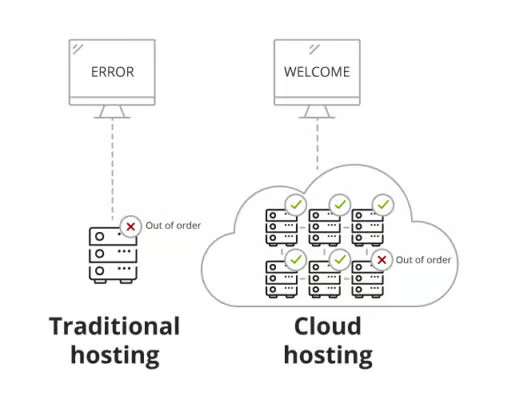
Beyond productivity gains, a well-designed QuickBooks cloud environment protects the numbers you rely on day in and day out. Automated nightly snapshots, geographically redundant storage and point-in-time recovery options shield your company from hard-drive crashes, regional outages or accidental deletions – letting you roll back to a clean copy in minutes rather than scrambling for an old thumb-drive backup later on. Those safeguards translate into true business continuity and enterprise-grade disaster recovery, even for lean teams without dedicated IT staff.
In that same webinar, we emphasized peace of mind for first-time cloud adopters, noting that you can “go through and do month-to-month billing in order to eliminate that concern of being locked into any kind of service agreement.” That flexible arrangement, paired with a review of the hosted setup and special hosting offers from providers like Skyline Cloud Services, lets you spin up a trial environment, import a copy of your live file and evaluate speed, integrations and workflows before making a long-term commitment.
Still deciding if hosting is a fit? Start by asking whether you need multi-user access from multiple locations, whether you rely on more than one QuickBooks version and how quickly you’d need to bounce back from a hardware failure. Answering those questions will point you toward the right next steps.
Take the Next Step Toward an Informed Hosting Decision
Moving QuickBooks to a hosting provider isn’t a one-size-fits-all upgrade. The right choice depends on three fundamentals:
- Your workflow: do multiple people need real-time, remote access from different locations?
- Your technology mix: do you juggle several QuickBooks versions, integrations or rely on a web of add-ons that could benefit from a central hub?
- Your risk tolerance: how much downtime, data loss or security-compliance exposure can your organization realistically afford?
By matching those answers against the performance, data-security and cost profiles of shared versus dedicated servers, you’ll arrive at a hosting model that supports growth instead of holding it back.
Ready for tailored guidance that factors in your unique processes, user counts and budget? Contact our support team at Fourlane today for a no-pressure consultation about QuickBooks hosting solutions. We can walk you through testing, month-to-month options and a clear roadmap for migrating your QuickBooks Enterprise files to the cloud – so you can decide with confidence whether partnering with a QuickBooks hosting provider is the right move for your business.
