

Intuit Enterprise Suite (Intuit ERP) Dimensions Overview
If your month-end reports left you wondering why yesterday’s “profitable” project suddenly looks like a loss today, you’re not alone. The gap between raw data and real insight can swallow countless hours and even strategic opportunities before anyone notices.
Dimensions in Intuit Enterprise Suite (IES) can close that gap, but only when they’re designed intentionally. As Laura Davidsen, partner at Fourlane, puts it: “Well-designed dimensions fade into the background. They don’t add friction. They quietly make reporting clearer, faster, and more reliable.” The way you tag and analyze transactions can determine whether leaders debate the numbers or act on them with confidence.
This guide explains what dimensions are, when to use them, how to design them correctly, and how they work alongside projects and products to deliver scalable, trusted reporting.
What Dimensions Are (and What They Are Not)
At their core, dimensions are flexible analytical tags applied at the transaction line level. They sit alongside your existing accounting structure – they do not replace it.
Dimensions do not replace:
- Your chart of accounts
- Your products and services
- Your customers
- Your projects/jobs
- Your entity structure
Instead, dimensions add context. They help answer questions like:
- Where did this revenue or cost come from?
- What operational lens does leadership want to analyze across the business?
- Who or what drove performance outcomes?
A common mistake is using dimensions as a workaround for structural issues – like avoiding chart-of-accounts cleanup or creating “extra reporting” because products/services aren’t set up cleanly. That approach almost always leads to cluttered reporting and user frustration.
Key takeaway: Dimensions help you analyze data. They don’t tell the system how to post it.
Where Dimensions Live in Intuit Enterprise Suite
To use dimensions well, it’s critical to understand where they actually live:
Dimensions ARE applied on transactions, at the line level, when users enter:
- Bills
- Expenses
- Invoices
- Journal entries
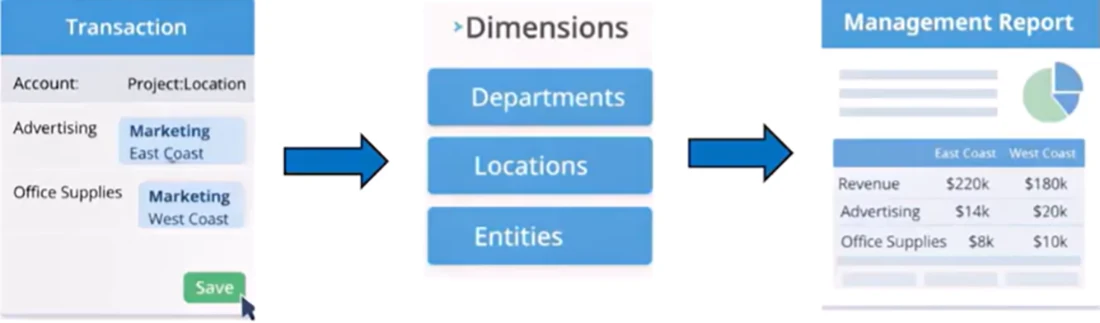
Dimensions do NOT live on:
- Customers
- Projects
- Products/services
- Entities
IES doesn’t automatically infer dimensions. They flow entirely from how transactions are entered which creates two important realities:
- Reporting accuracy depends on transaction behavior, not master data.
If a transaction is missing a dimension, it won’t show in dimension-based reports. - Dimensions reward discipline — they don’t create it.
Consistent entry produces clean reporting. Inconsistent entry gets exposed.
Dimensions vs. Entities, Projects, Products, and Classes
A major source of confusion is trying to make one tool do another tool’s job. Here’s the clean way to think about each:
- Entities answer: Which legal company does this belong to?
If it has a separate bank account or tax return, it’s an entity — not a dimension. - Projects answer: What job, engagement, or initiative is this tied to over time?
Projects group revenue and costs across transactions and periods to measure job performance. - Products/Services answer: What did we sell or buy?
They drive revenue categorization, COGS mapping, and operational detail. - Classes answer: Which broad operational bucket does this fall into?
Often more rigid and sometimes used for legacy summary reporting. - Dimensions answer: How do we want to analyze this transaction across the business?
Dimensions provide cross-cutting lenses that avoid exploding account or item lists.
Goal: track the right things in the right place, not everything everywhere.
When to Use Dimensions: A Practical Decision Framework
Before adding another dimension, run through these four questions:
- Is this something leadership needs to analyze repeatedly?
Dimensions are best for recurring monthly/quarterly analysis – not one-off questions. - Does it cut across multiple transaction types?
Strong dimensions apply to bills, expenses, invoices, and journals – not just one workflow. - Would this otherwise require duplicating accounts or items?
If the alternative is dozens of near-duplicate accounts or products, a dimension may be the right tool. - Can it be applied consistently at the point of entry?
If the right value is subjective or unclear in the moment, reporting will suffer.
If most answers are “yes,” a dimension likely makes sense. If not, the need often belongs in your chart of accounts, products/services, projects, or reporting logic.
Where dimensions shine
- Customer segment, region, or business line analysis across the organization
- Marketing campaign tracking that touches bills, sales, and reallocations
- Internal vs. external labor analysis hitting the same payroll accounts
- Service-type comparisons (residential vs. commercial vs. government) without duplicating items
When another tool is smarter
- One-off board questions that won’t recur
- Situations tied to a single transaction type
- Subjective tagging that entry teams can’t apply reliably
- Foundational design issues that require cleanup, not another label
Designing Dimensions with Intention: Principles That Keep Reporting Clean
Design matters as much as the decision to use a dimension. Poorly designed dimensions don’t just fail, they make reporting harder to trust.
Principles for effective dimension design
- Support decisions, not curiosity
If leadership can’t articulate how they’ll use it, it probably doesn’t belong. - Keep lists short and meaningful
Long, ever-growing lists increase errors and dilute insight. - Use stable, business-level categories
Choose values that won’t change frequently or require constant redefinition. - Make values mutually exclusive
Each transaction line should clearly belong to one value – no overlap. - Align with real workflows
If an AP clerk or foreman can’t confidently choose the right value at entry, the design is flawed. - Design backward from reporting outputs
Dimensions should simplify reporting, not require complex filters or explanations.
How Dimensions Work with Projects and Products
The best reporting doesn’t come from choosing between products, projects, or dimensions – it comes from how they work together.
Think of it as a three-layer lens:
- Products/services = detail (what you sold/bought: labor, materials, subcontract)
- Projects/jobs = depth (how a specific job performed over time)
- Dimensions = perspective (patterns and comparisons across jobs, departments, and entities)
As Davidsen explains, when each tool does its own job, reporting becomes clearer, not more complicated.
Example: Work Type Dimension (Construction)
A construction firm might have:
- A project: “Gas Line Inspection”
- Products/services: labor and materials
- A dimension: Work Type (Commercial, Residential, Government)
The dimension doesn’t describe the job – the project already does that. The dimension exists so leadership can answer questions like:
- How profitable is commercial work overall?
- How does it compare to residential or service work?
- How is performance trending over time?
Projects show you what happened on one job. Dimensions show you patterns across jobs.
A Reporting Example: Turning a P&L Into a Decision Tool
A standard P&L is useful, but it often can’t answer leadership questions like:
“How profitable is commercial work compared to residential and government work?”
Add a Work Type dimension and run the same report:
- No accounts change
- No items get duplicated
- You simply add a reporting lens
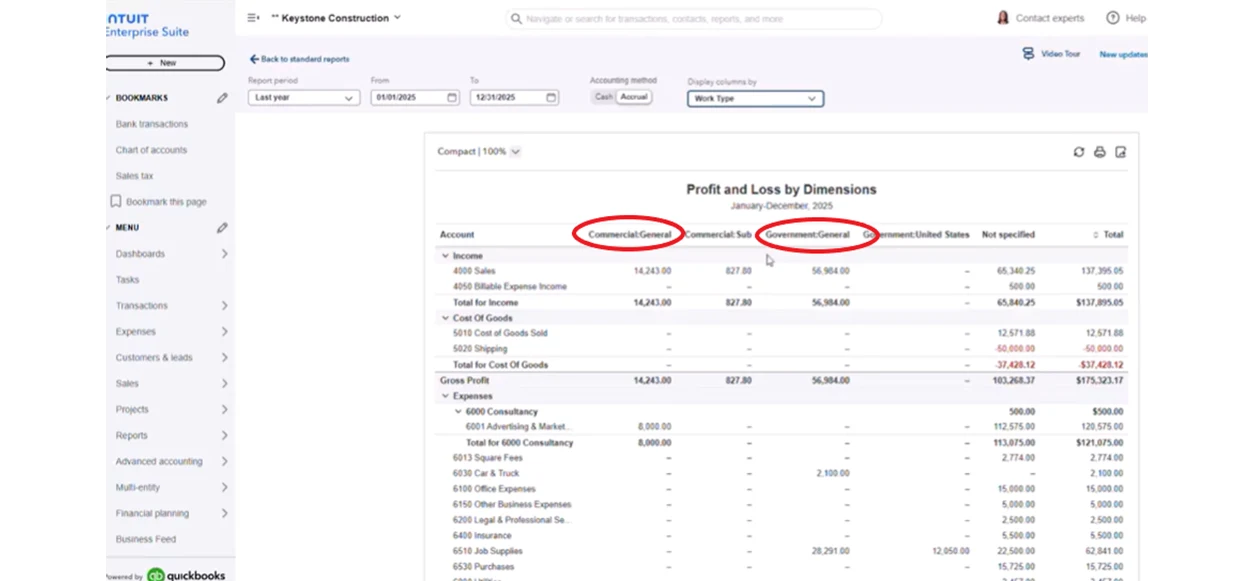
Now leadership can see performance by type of work and drill all the way down to the bills and invoices driving results.
Just as importantly: if a dimension is missed during entry, that activity won’t show up in the dimension report. Dimensions don’t fix bad data, they expose it.
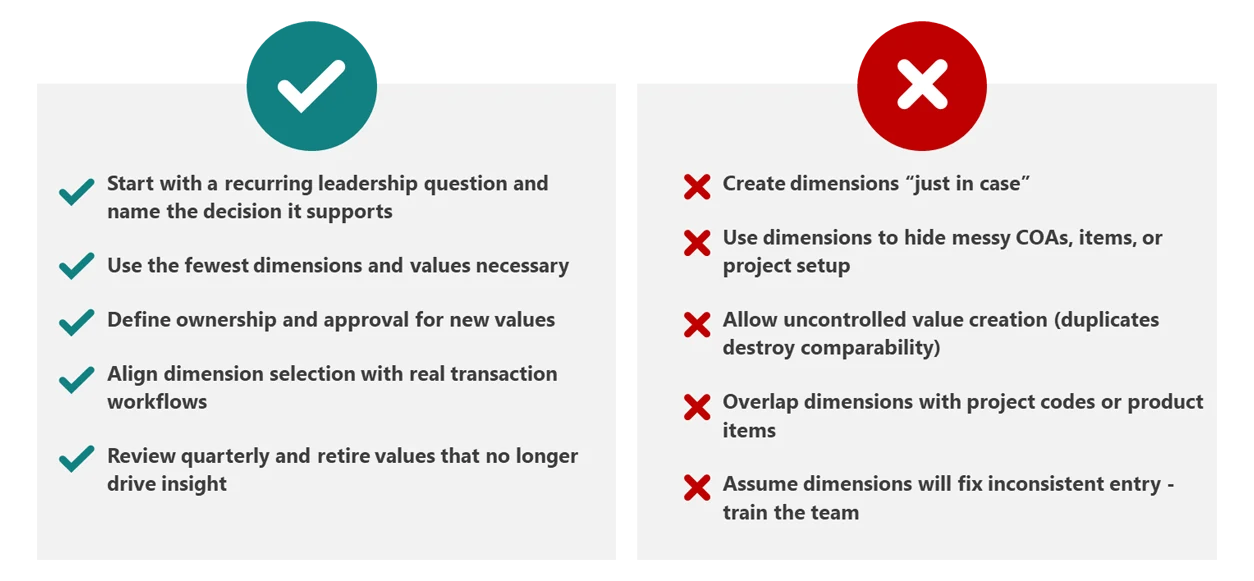
Actionable Checklist: Do’s and Don’ts for Trusted, Scalable Dimensions
Move From Data to Insight: Take Control of Your Reporting Strategy
Dimensions are incredibly powerful but only when used for what they’re meant to do: adding insight on top of a clean foundation.
The healthiest systems aren’t the ones with the most dimensions. They’re the ones with fewer, more intentional dimensions – designed around real business decisions and applied consistently at entry.
When every dimension supports a decision and every transaction carries the right value, your reports stop being static snapshots and become decision-ready tools that guide strategy and reveal opportunities.
Ready to turn Intuit Enterprise Suite into a decision-making engine?
Contact Fourlane for a personalized consultation on designing scalable dimensions, streamlining reporting, and building dashboards your leadership team can trust. Dimensions in Intuit Enterprise Suite can unlock powerful reporting across projects, entities, and service lines, but only when they are designed with intention.
- Design dimensions that support leadership reporting and operational insights
- Align dimensions with projects, products, and entities for clean financial analysis
- Build scalable reporting structures that grow with your organization
Learn about our Intuit Enterprise Suite consulting services.
