

Why a Sandbox Matters During and After Your Accounting System Migration
Migrating to a new financial or accounting system involves much more than moving data. Whether your business is transitioning to Intuit Enterprise Suite (IES), QuickBooks Online, QuickBooks Enterprise, or another accounting platform, your team may also need to rebuild workflows, connect applications, establish user permissions, validate financial data, recreate reports, and train employees.
Testing those changes directly in a live accounting environment creates unnecessary risk. An accounting system sandbox, or controlled test environment, gives your team a safer place to test configurations, integrations, data migrations, and business processes before they affect live financial data.
Sandbox testing is especially valuable during an accounting system migration, but its usefulness does not end at go-live. A test environment can also support troubleshooting, employee training, system updates, integration testing, and long-term change management.
If your organization needs help managing the process, Fourlane’s data migration specialists incorporate controlled testing and validation into migration projects.
What’s in this Article?
- What Is an Accounting System Sandbox?
- Why Sandboxes Matter During an Accounting System Migrations
- Why You Still Need a Test Environment After Migration
- How Sandboxes Support Accounting System Change Management
- Accounting System Sandbox Testing Best Practices
- Frequently Asked Questions
What Is an Accounting System Sandbox?
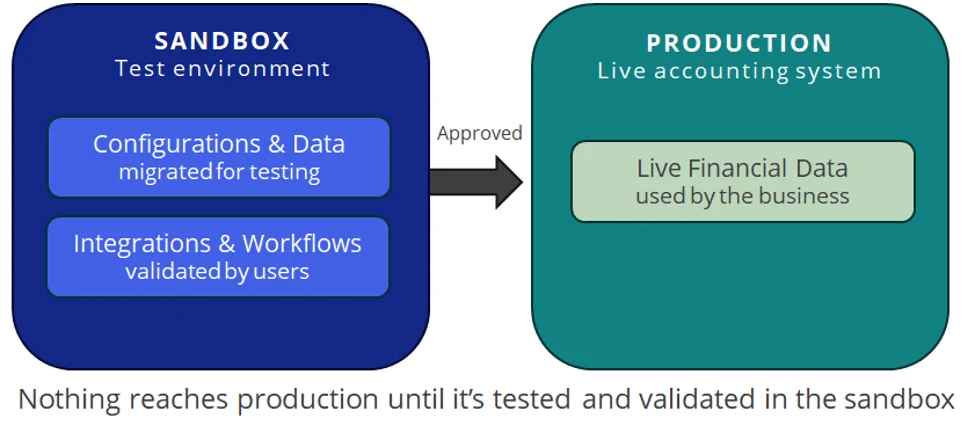
An accounting system sandbox is a non-production environment used for testing, development, training, and experimentation. Although the exact capabilities vary by accounting platform, the goal is the same: validate changes before they affect live financial data.
For businesses using platforms such as Intuit Enterprise Suite, QuickBooks Online, or QuickBooks Enterprise, a testing strategy becomes particularly important when migrating data, connecting applications, modifying workflows, or introducing new processes.
Instead of making a change in your live accounting system and hoping it works as expected, a test environment supports a controlled process:
- Build: Configure the system, migrate test data, or develop the proposed change in the sandbox.
- Test: Run configurations, transactions, workflows, and integrations through realistic scenarios.
- Validate: Have accounting users confirm that data and processes produce the expected results.
- Deploy: Move approved configurations or processes into the production environment.
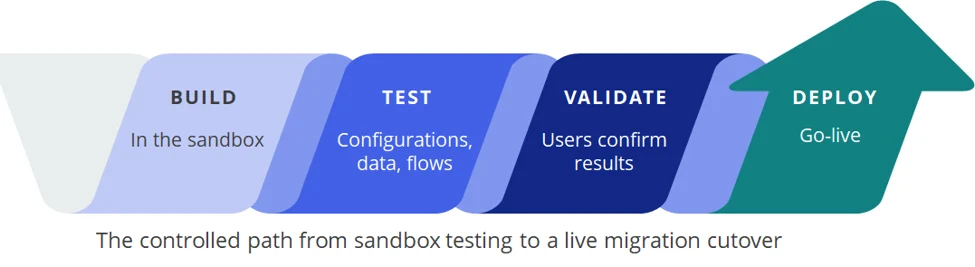
This controlled process becomes especially important during a financial system migration because multiple parts of the accounting operation may be changing at the same time.
Why Sandboxes Matter During an Accounting System Migrations
A financial system migration requires decisions about how data, workflows, integrations, reporting, permissions, and accounting processes will operate in the new environment. A sandbox gives the migration team a place to validate those decisions before the new system becomes the organization’s source of truth.
1. Test Accounting System Configurations Without Disrupting Operations
Modern accounting and ERP platforms can contain a wide range of configurations that affect how employees enter, approve, process, and report financial information.
Testing may include:
- User roles and permissions
- Approval processes
- Chart of accounts
- Classes, locations, departments, or other tracking dimensions
- Custom fields
- Forms and templates
- Transaction workflows
- Financial reporting
- Automation
- Third-party integrations
A sandbox allows the migration team to configure and validate these components without interrupting normal accounting operations. If something does not work as expected, the team can adjust the setup and test it again before introducing the change to live users.
This ability to iterate safely is particularly useful during an accounting system migration because requirements often evolve once accounting teams begin working through real-world scenarios in the new platform.
2. Validate Financial Data Before Go-Live
Data migration is one of the most important and potentially risky parts of changing accounting systems. Depending on the platforms and business requirements involved, an accounting system migration may include:
- Chart of accounts
- Customers and vendors
- Products and services
- Open invoices and bills
- Accounts receivable and accounts payable
- Inventory and fixed assets
- Historical transactions and beginning balances
- Supporting lists and records
A sandbox provides an opportunity to complete accounting data migration testing before final cutover. Trial migrations give accounting teams time to validate the results and correct discrepancies before employees begin entering transactions in the new production system.
Key validation questions include:
- Did all required records migrate?
- Do beginning balances reconcile with the previous accounting system?
- Are customer and vendor balances correct?
- Do open invoices and bills match the source system?
- Does the general ledger reconcile?
- Does historical reporting meet the organization’s requirements?
Discovering discrepancies during a test migration is far easier than finding them after employees have started entering new transactions. This is also why experienced accounting migration consulting can be valuable. Experienced teams understand which records and workflows require especially careful validation.
3. Test QuickBooks and Accounting Integrations End to End
Accounting systems rarely operate alone. Businesses using QuickBooks, Intuit Enterprise Suite, and other financial platforms may connect accounting data with:
- Payroll applications
- Banking platforms
- CRM systems
- Ecommerce platforms
- Expense management tools
- Payment processors
- Tax applications
- Inventory systems
- Reporting and analytics tools
- Industry-specific applications
Testing an individual integration is important, but it may not reveal what happens as information travels through the entire technology ecosystem.
A controlled environment allows teams to perform accounting integration testing without creating incorrect, incomplete, or duplicate transactions in the live books. Testing may uncover problems with data mappings, synchronization timing, permissions, authentication, duplicate records, transaction errors, or unexpected downstream effects before they become production issues.
4. Include Accounting Users in User Acceptance Testing
Technical testing tells you whether a system functions. Accounting users help determine whether it actually works for the business.
User acceptance testing gives employees who will work in Intuit Enterprise Suite, QuickBooks Online, QuickBooks Enterprise, or another financial platform an opportunity to validate their day-to-day processes.
Users may test scenarios such as:
- Creating invoices
- Entering vendor bills
- Recording payments
- Managing customer and vendor records
- Reviewing transactions
- Processing approvals
- Reconciling accounts
- Managing inventory
- Running financial statements
- Completing month-end activities
These tests frequently uncover issues technical testing alone may miss. A process can technically work but require too many manual steps. A permission setting may prevent an employee from completing a critical task. A report may contain accurate information but fail to present it in the format management needs.
Identifying those issues before go-live gives the migration team time to correct them.
5. Create a Safe Environment for Accounting System Training
A sandbox also gives employees a safer environment for hands-on accounting system training. Instead of relying only on demonstrations, users can practice realistic business scenarios themselves.
Employees can create transactions, explore workflows, run reports, and work through common accounting responsibilities without changing live financial data.
For businesses transitioning between QuickBooks Desktop Enterprise, QuickBooks Online, Intuit Enterprise Suite, or another accounting platform, hands-on practice also helps employees understand how processes will differ between the old and new environments.
Training becomes less about memorizing where buttons are located and more about understanding how the organization’s accounting processes will operate after a migration.
Why You Still Need a Test Environment After a Migration
A common misconception is that sandbox environments are only useful during implementation. In reality, go-live is not the end of an accounting system’s evolution.
Businesses add employees, change processes, introduce products and services, adopt new applications, automate manual tasks, and respond to changing reporting requirements. The financial technology environment evolves with the business.
Maintaining an appropriate testing strategy after a migration creates a safer way to manage those changes.
Test Accounting System Changes Before Production
Consider an accounting team that wants to modify a workflow, introduce a new application integration, build an automation, change reporting, or implement a customization.
Making the change directly in the live accounting system means the first real test could occur while employees are working or while actual financial transactions are being processed.
A safer process is to:
- Develop: Draft or configure the proposed change.
- Test: Run the change in the sandbox or other controlled environment.
- Validate: Confirm the results against expected outcomes.
- Approve: Obtain appropriate stakeholder sign-off.
- Deploy: Introduce the approved change into production.
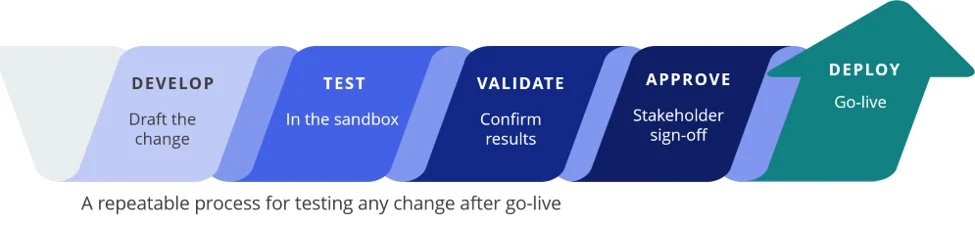
Testing changes before production can reduce operational disruption and give stakeholders more confidence that the change will behave as expected.
Troubleshoot Without Experimenting on Live Financial Data
Accounting system problems are not always straightforward. Administrators, consultants, or application specialists may need to reproduce an issue, change a configuration, test permissions, or create transactions to understand what is happening.
Doing that directly in a live company file or production environment can create additional problems.
A separate testing environment provides a place to investigate without filling the live accounting system with test transactions or making experimental changes to production settings. This separation can be particularly valuable when troubleshooting integrations, transaction workflows, reporting, permissions, or data synchronization.
Prepare for New Accounting Software Features and System Changes
Financial software continues to evolve after implementation. Platforms such as Intuit Enterprise Suite and QuickBooks Online introduce new functionality and changes over time. Businesses using QuickBooks Desktop environments may also need to evaluate updates to software, integrations, workflows, and supporting applications as their technology environment evolves.
Changes may affect:
- User workflows
- Integrations
- Reporting
- Permissions
- Automation
- APIs and connected applications
- Existing business processes
Testing significant changes before introducing them to live accounting operations can help uncover unintended consequences. This becomes increasingly important as an organization’s financial technology stack grows more complex.
Organizations using IES can also review official Intuit Enterprise Suite product updates as they evaluate changes that may require testing or user preparation.
Use Test Environments for Ongoing Employee Training
Accounting system training does not stop after a migration. New employees need to learn the platform, existing employees move into new roles, processes change, and new applications are introduced.
A test environment gives employees a safer place to practice. Rather than learning with real customer invoices, vendor bills, payments, or journal entries, employees can work through realistic scenarios without affecting the company’s books.
That makes a sandbox useful not only for migration teams and consultants, but also for ongoing employee development.
How Sandboxes Support Accounting System Change Management
Your accounting system contains some of your organization’s most important financial information. Changes to that environment deserve a controlled process.
Separating testing from live accounting operations creates a clear boundary between experimentation and production. Before introducing a workflow, integration, configuration, or process, teams can verify that it works as intended.
For organizations with increasingly complex accounting environments, sandbox testing can strengthen financial system change management by establishing a repeatable process for testing, documenting, approving, and implementing changes.
| Stage | Purpose |
|---|---|
| Develop | Configure or prepare the proposed system change. |
| Test | Run realistic scenarios in a controlled environment. |
| Validate | Confirm that data, workflows, integrations, and reporting perform as expected. |
| Approve | Document results and obtain stakeholder approval. |
| Deploy | Move the approved change into the live accounting environment. |
Accounting System Sandbox Testing Best Practices
Having access to a sandbox is only valuable when the organization uses it consistently. A structured testing process helps teams identify problems earlier and provides a clearer path from development to production.
- Keep the environment representative: Make the testing environment reflect the current production configuration when possible.
- Define test scenarios: Document specific scenarios and expected results before testing begins.
- Include accounting users: Use user acceptance testing to validate real-world accounting processes.
- Test integrations end to end: Confirm how information moves through connected systems rather than testing only one connection.
- Reconcile migrated financial data: Validate balances and critical records before approving go-live.
- Validate financial reporting: Confirm that important reports and financial statements produce the expected results.
- Document changes: Maintain records of configurations, test results, approvals, and identified issues.
- Define the production process: Establish how approved changes will move from testing into the live environment.
- Use test data for training: Avoid having employees practice with real financial transactions.
- Retest critical workflows: Repeat testing after significant system, configuration, or integration changes.
The goal is not simply to maintain another environment. The goal is to make testing a consistent part of how the organization manages its financial systems.
Frequently Asked Questions About Accounting System Sandboxes
What is a sandbox in an accounting software?
A sandbox is a separate, non-production environment used to test configurations, transactions, integrations, workflows, training scenarios, or other changes without affecting an organization’s live financial data. Available sandbox capabilities vary by accounting platform.
Why is sandbox testing important during an accounting system migration?
Sandbox testing allows teams to validate migrated data, financial balances, workflows, integrations, permissions, reporting, and user processes before the new accounting system goes live. Finding issues during testing can reduce disruption after migration.
Can you use a sandbox when migrating QuickBooks?
Yes. A controlled test environment can be valuable when planning a QuickBooks migration involving QuickBooks Online, QuickBooks Desktop, Intuit Enterprise Suite, or another financial system. The appropriate testing approach depends on the products, migration method, integrations, and tools involved.
Fourlane’s migration team can help businesses determine the appropriate strategy for their systems.
Do you still need a sandbox after an accounting system migration?
Maintaining a sandbox or another controlled testing environment after a migration can provide significant value. Teams can use it to evaluate integrations, troubleshoot problems, test process changes, train employees, and validate significant changes before introducing them into the live accounting system.
What should you test during a financial system migration?
Financial system migration testing should typically cover migrated records, opening balances, accounts receivable, accounts payable, transaction history, integrations, user permissions, critical workflows, financial reporting, and reconciliation between the old and new systems.
Keep Your Accounting System “Safety Net” After Go-Live
During a financial system migration, your testing environment helps answer a critical question: Is this ready for production?
After your migration, the question changes: Is this change safe to put into production?
The need for controlled testing does not disappear after go-live. Accounting systems are not static, and neither are the businesses that rely on them. Processes change, integrations evolve, employees move into new roles, and new requirements emerge.
Whether your organization uses Intuit Enterprise Suite, QuickBooks Online, QuickBooks Enterprise, or another financial platform, a strategy for safely testing changes gives the business room to evolve without turning live financial data into a testing ground.
Used effectively, an accounting system sandbox becomes more than a migration tool. It supports a long-term strategy for maintaining reliable financial systems, protecting data integrity, and managing change with confidence.
Planning an Accounting System Migration?
A controlled testing and validation process can help protect your financial data while giving users, integrations, and workflows time to prove they are ready for production.
Talk to Fourlane’s data migration experts about planning, testing, validating, and supporting your QuickBooks or Intuit Enterprise Suite migration.
- Accounting and ERP data migration planning
- Trial migrations, validation, and reconciliation
- Integration and workflow testing
- User training and go-live support