

QuickBooks Desktop Enterprise is still a strong platform for inventory-heavy and manufacturing businesses. But when it comes to workflow automation and built-in AI, QuickBooks Online Advanced (QBOA) has pulled well ahead.
Since mid-2025, Intuit has added AI agents, conversational reporting, continuous bookkeeping, and a deep library of automated workflows to QBOA. None of these has a direct equivalent inside Desktop Enterprise.
Desktop is still receiving updates, as covered in our look at what’s new in QuickBooks Enterprise 2026, but those releases have focused on reports and forms rather than automation or AI.
This guide walks through the specific QuickBooks Online Advanced AI tools and workflows that Desktop Enterprise users don’t have today, and how to decide whether they matter for your business.
Features verified October 2026.
Key Takeaways
- Workflows: QBOA includes 60+ customizable workflow templates and multi-approver approvals for sales and expense transactions. Desktop Enterprise approvals cover only purchase orders and bills.
- AI agents: QBOA includes Intuit Assist and specialized AI agents for accounting, payments, customers, finance, projects, payroll, and sales tax. Desktop Enterprise has no comparable built-in AI.
- Reporting: Intuit Intelligence Chat (beta, admin-only) adds plain-language reporting and scenario forecasting.
- Close: Books Upkeep keeps the books current all month, so month-end becomes a review of exceptions.
- Where Desktop wins: Manufacturing, serial and lot tracking, barcode scanning, and warehouse workflows.
In this article:
- The short answer
- Workflow automation in QuickBooks Online Advanced
- Intuit Assist and the AI agent team
- Intuit Intelligence Chat and conversational reporting
- Books Upkeep and a faster month-end close
- Spreadsheet Sync and batch tools
- Automated sales tax
- QBOA vs. Desktop Enterprise comparison
- Where Desktop Enterprise still wins
- How to get value from QBOA automation
- Frequently asked questions
What Workflows and AI Does QuickBooks Online Advanced Have That Desktop Enterprise Doesn’t?
QuickBooks Online Advanced includes 60+ customizable workflow templates, multi-step approval workflows for sales and expense transactions, Intuit Assist, a team of AI agents for accounting, payments, customers, finance, projects, payroll, and sales tax, plus conversational AI reporting through Intuit Intelligence. QuickBooks Desktop Enterprise offers approval workflows only for purchase orders and bills and has no comparable built-in AI functionality.
That conclusion comes from Fourlane’s October 2026 feature analysis comparing QuickBooks Online Advanced with QuickBooks Desktop Enterprise Diamond and Platinum. Fourlane is an Elite QuickBooks Solution Provider and an official Intuit Enterprise Suite reseller.
You can download the full QBOA vs. Desktop Enterprise comparison PDF for the complete feature-by-feature breakdown.
Workflow Automation in QuickBooks Online Advanced
Workflows in QuickBooks Online Advanced are rule-based automations. You define what QuickBooks should do and when, and the system handles routine follow-through automatically. Desktop Enterprise relies much more on manual reminders, memorized transactions, and staff discipline.
60+ Workflow Templates
According to Intuit’s workflow documentation, QBOA includes more than 60 workflow automation templates covering invoices, bills, estimates, purchase orders, bill payments, and more. Each template can be adjusted with your own actions and conditions.
Common examples include:
- Invoice reminders: Automatically nudge customers before or after a due date.
- Internal task reminders: Alert team members when estimates, bills, or invoices need attention.
- Notifications: Send updates to the right people when a transaction meets specific criteria.
Multi-Condition, Multi-Approver Approvals
QBOA supports approval workflows with multiple conditions, multiple approvers, and a defined approval order. When a non-admin user creates a transaction that meets the conditions, QuickBooks holds it until the required approvals are complete.
Approvers receive an email and a task in QuickBooks, which helps keep approvals from stalling in someone’s inbox.
This is one of the clearest gaps between the platforms. Desktop Enterprise offers approval workflows for purchase orders and bills, but QBOA extends approvals and automation to the sales side, including invoices and other sales forms.
Custom Workflows
When a template isn’t a fit, QBOA lets you build a custom workflow from scratch by choosing the record type, the action, and the conditions. For growing teams, this means internal controls can be built into the system instead of documented in a procedure manual that nobody opens.
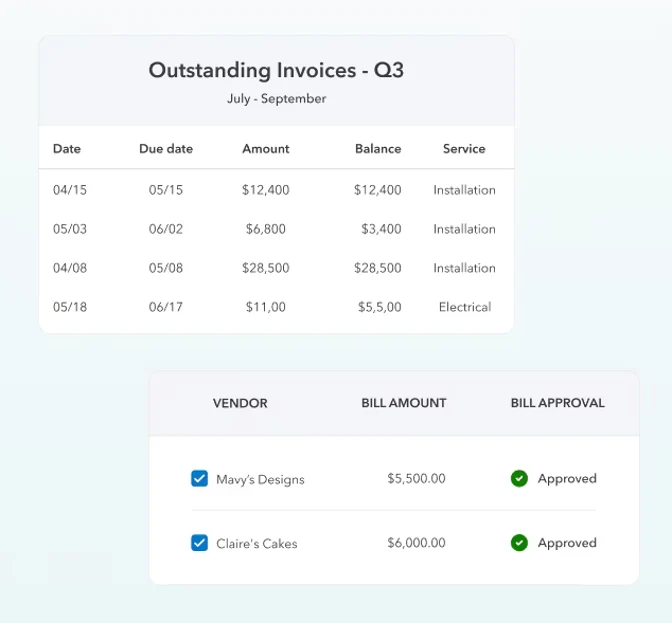
QBOA connects invoicing, bill pay approvals, and reporting in one workflow. Image source: Intuit QuickBooks.
Intuit Assist and the QuickBooks Online Advanced AI Agents
Intuit Assist is Intuit’s AI layer inside QuickBooks Online. In 2025, Intuit expanded it into a virtual team of specialized AI agents, each focused on a specific area of the business. These agents surface recommendations and draft work for review, while leaving final decisions with you.
QuickBooks Online Advanced includes access to several agents, including the Finance Agent and Project Management Agent, which are reserved for Advanced and above. Two agents have extra requirements:
- The Payroll Agent needs a QuickBooks Payroll subscription.
- The Sales Tax AI Agent is a beta feature with limited availability.
Some other capabilities are also in beta, and availability can change. Intuit lists current agents by plan on its QuickBooks Online plans page.
| AI Agent | What It Helps With | Desktop Enterprise Equivalent |
|---|---|---|
| Accounting Agent | Transaction categorization, matching, and reconciliation support | Bank rules and manual review |
| Payments Agent | Invoice tracking, payment reminders, and suggestions to help you get paid faster | None built in |
| Customer Agent | Sourcing leads from your inbox, drafting follow-ups, and tracking opportunities | None built in |
| Finance Agent | Month-end insights, performance summaries, KPI analysis, and scenario planning | None built in |
| Project Management Agent | Flagging margin issues and cost overruns on projects | Job costing reports reviewed manually |
| Payroll Agent | Payroll prep, updates, insights, and payroll drafts for admins and employees (requires QuickBooks Payroll) | Desktop Payroll, run manually |
| Sales Tax AI Agent (beta) | Pre-file check comparing P&L income with net sales on the sales tax return, with suggested fixes | Manual sales tax items and liability reports |
You can learn more about the planning and analysis side on Intuit’s QuickBooks Finance Agent page.
Intuit Intelligence Chat and Conversational Reporting
Intuit Intelligence Chat lets finance leaders ask questions in plain language, run reports, and start workflows inside QuickBooks Online Advanced. Instead of building a report and scrolling through rows, you can ask a direct question and get an answer based on your live company data.
Intuit Intelligence Chat is currently in beta, is available only to admin users, and has a monthly usage capacity. It may not be available to every team member or for unlimited use, so confirm current access and limits with Intuit before building a reporting process around it.
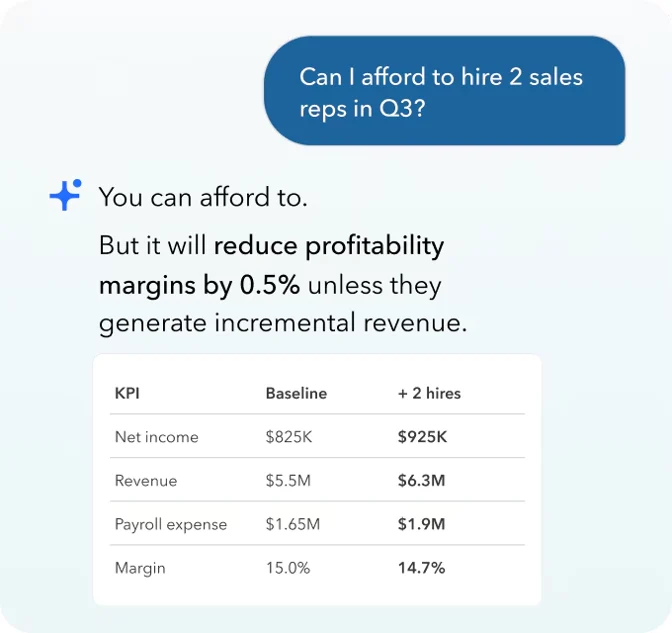
Intuit Intelligence running a what-if forecast in plain language. Image source: Intuit QuickBooks.
As IT Brief reported in August 2026, the tool requires user confirmation before it takes any action. That keeps a person in control of what actually changes in the books.
The same update added redesigned KPI scorecards for measures such as revenue, margin, and cash, along with conversational forecasting tools for exploring variances and running scenarios.
In Desktop Enterprise, the same insight usually requires running Advanced Reporting or exporting to Excel, then building the analysis by hand. For a deeper look at how conversational AI reporting works in practice, see our article on AI financial reporting in Intuit Enterprise Suite, which uses the same Intuit Intelligence foundation.
Books Upkeep and a Faster Month-End Close
Books Upkeep is an AI-based capability in QBOA that works continuously throughout the month to keep the books current. (Intuit’s pricing page describes a similar service as Continuously Clean Books.) It can resolve high-confidence transactions automatically based on rules you define, while flagging exceptions for human review.
Books Upkeep is turned off by default for companies that work with an accountant or bookkeeper. If an outside firm manages your books, coordinate with them before turning it on so automated changes don’t overlap with their review process.
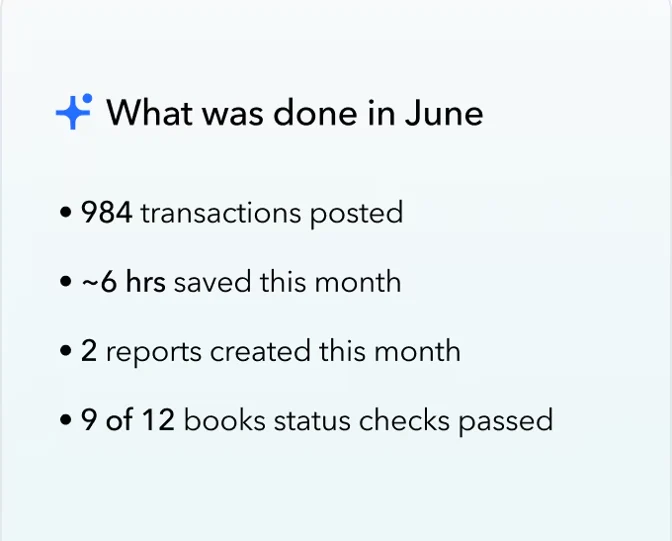
Intuit Intelligence summarizes the bookkeeping work it completed during the month. Image source: Intuit QuickBooks.
The practical result is that month-end becomes a review of exceptions rather than a catch-up project. Desktop Enterprise has no equivalent continuous-bookkeeping feature, so close timing depends entirely on how quickly your team works through transactions.
Businesses that want a human expert reviewing what the AI flags can pair QBOA with QuickBooks bookkeeping services.
QBOA subscriptions also include 1099 e-filing and ACH payments, which reduces the number of separate tools needed around the close.
Effective August 1, 2026, Bill Pay Elite for accounts payable is included only when QBOA is purchased directly from QuickBooks.com or QuickBooks Sales. If you buy QBOA through Fourlane or another accountant, confirm whether Bill Pay Elite is part of your subscription before planning your AP process around it. Our breakdown of QuickBooks Online pricing changes in 2026 covers the current rates.
Spreadsheet Sync and Batch Tools
Not every time-saver in QBOA is labeled as AI. Two of the most useful workflow tools for former Desktop users are:
- Spreadsheet Sync: Pull live QuickBooks data into Excel, make bulk changes, and sync supported transactions, budgets, and journal entries back into QuickBooks.
- Batch transactions: Create, edit, or send groups of transactions at once instead of one at a time.
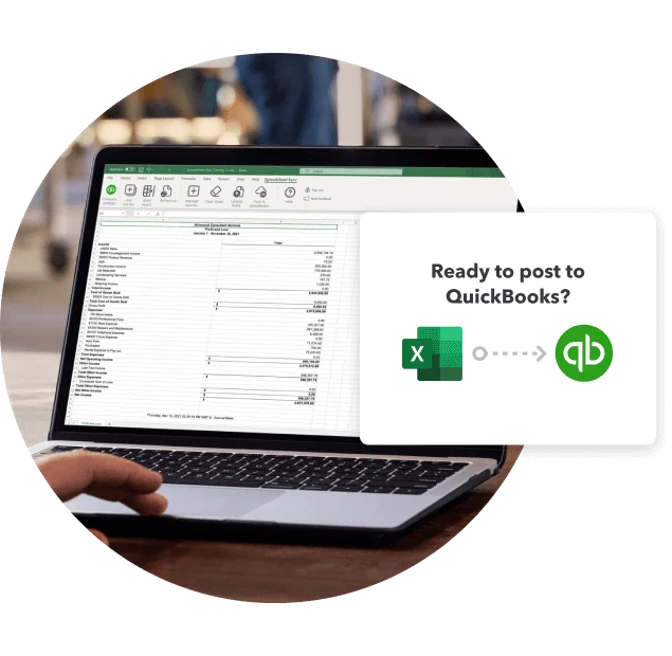
Spreadsheet Sync moves data both ways between QBOA and Excel. Image source: Intuit QuickBooks.
Desktop Enterprise can export to Excel and import lists, but it does not offer two-way sync of live data back into the company file.
Automated Sales Tax in QuickBooks Online
Sales tax is one of the most practical differences between the platforms, and it isn’t limited to Advanced. Every QuickBooks Online plan calculates sales tax automatically based on the customer’s location, the item sold, and the transaction date.
Desktop Enterprise takes a manual approach. You create a sales tax item for each county, city, or district where you collect tax, then maintain those rates yourself as they change. For businesses that sell into many jurisdictions, that upkeep takes time and increases the risk of charging the wrong rate.
QuickBooks Online Plus and Advanced build on automatic rates with the Sales Tax AI Agent (beta). It suggests product tax categories for your items and runs a pre-file check that compares your P&L with your sales tax return, so discrepancies surface before you file.
QuickBooks Online Advanced vs. Desktop Enterprise: Workflow and AI Comparison
The table below summarizes the workflow and AI differences from Fourlane’s October 2026 analysis.
| Capability | QuickBooks Online Advanced | QuickBooks Desktop Enterprise |
|---|---|---|
| Sales workflow automation | Yes | No sales approvals or custom workflows; basic payment reminders only |
| Expense workflow automation | Yes | Limited to purchase orders and bills |
| Custom workflows | Yes, with multiple conditions and approvers | No |
| AI agents | Accounting, Payments, Customer, Finance, Project Management, Payroll (with QuickBooks Payroll), and Sales Tax (beta) | No comparable built-in AI |
| Conversational reporting | Intuit Intelligence Chat (beta, admin-only, monthly usage limits) | No |
| Forecasting and scenario planning | P&L-based forecasts plus conversational scenarios via Intuit Intelligence (beta) | Cash Flow Projector and basic forecasts; no scenario planning or AI forecasting |
| Continuous AI bookkeeping | Books Upkeep (Continuously Clean Books); off by default for accountant-managed companies | No |
| Two-way Excel sync | Spreadsheet Sync | No |
| Automated sales tax | Yes, address-based rates plus Sales Tax AI Agent (beta) | No, manual rates |
Important: Some QBOA features listed above are in beta or require add-on products. Intuit’s packaging and availability can change, so confirm current features before making a platform decision.
Where QuickBooks Desktop Enterprise Still Wins
Automation and AI are not the only factors in choosing an accounting platform. Desktop Enterprise remains the stronger fit for businesses that depend on:
- Manufacturing and inventory assemblies
- Serial and lot tracking
- Barcode scanning and warehouse management
- Pick, pack, and ship workflows
Desktop Enterprise also has workflow and reporting strengths of its own. Platinum and Diamond include approval workflows for purchase orders and bills, so teams with straightforward AP controls may already have what they need. Every Desktop Enterprise subscription also includes Advanced Reporting, which gives finance teams flexible, pivot-style reporting without exporting to Excel.
If those features run your operation, losing them could outweigh the automation gains. For multi-entity or manufacturing businesses that still want cloud-based AI, Intuit Enterprise Suite may be a better path than QBOA.
Keep in mind that IES multilevel bills of materials and units of measure are still in beta or early access, so IES may not yet replace Desktop Enterprise for operations that rely on serial or lot tracking or barcode scanning. These inventory capabilities are being developed for IES specifically and may not come to QBOA.
Compare the options in our guides:
- Intuit Enterprise Suite vs. QuickBooks Desktop Enterprise
- Intuit Enterprise Suite vs. QuickBooks Online Advanced
How to Get Value From QuickBooks Online Advanced Workflows and AI
Moving to QBOA doesn’t automatically deliver time savings. The businesses that benefit most set up their workflows and agents deliberately.
- Map your current manual processes: List the approvals, reminders, and follow-ups your team handles by email, spreadsheet, or memory today.
- Start with high-volume workflows: Turn on invoice reminders and bill approvals first, since they deliver quick and visible results.
- Define approval rules and roles: Set clear conditions, approvers, and approval order, and pair them with custom user roles. QuickBooks consulting can help design controls that fit your team.
- Review AI suggestions consistently: Treat agent recommendations as a draft. Review, approve, and give feedback so results improve over time.
- Clean up data before you migrate: AI and automation work best on accurate, well-structured data, so address duplicates and unreconciled accounts first. A QuickBooks file review can identify issues before conversion.
- Train your team: Workflows only help if people trust them. QuickBooks training shortens the adjustment period.
For a broader look at the move itself, read our guide on switching from QuickBooks Desktop to QuickBooks Online Advanced.
Frequently Asked Questions
Does QuickBooks Desktop Enterprise have Intuit Assist or AI agents?
No. Intuit Assist, the AI agents, and Intuit Intelligence Chat are QuickBooks Online and Intuit Enterprise Suite features. Fourlane’s October 2026 analysis found no comparable built-in AI functionality in Desktop Enterprise. For more on Desktop’s outlook, read QuickBooks Desktop in 2026: Is This Finally the End?
Does QuickBooks Desktop Enterprise have approval workflows?
Yes, but they are limited to purchase orders and bills. QuickBooks Online Advanced extends approvals to sales transactions and supports custom, multi-condition workflows.
Are QBOA workflows available in other QuickBooks Online plans?
The customizable workflow and approval features covered in this article are QuickBooks Online Advanced features. Some simpler automations, such as recurring transactions and invoice reminders, are available in lower plans.
What is Intuit Intelligence Chat in QuickBooks Online Advanced?
Intuit Intelligence Chat is a conversational AI tool that lets admin users ask questions in plain language, run reports, and start workflows using live company data. It is currently in beta, has a monthly usage capacity, and requires user confirmation before it takes any action.
What is Books Upkeep in QuickBooks Online Advanced?
Books Upkeep is an AI-based capability that works continuously throughout the month, resolving high-confidence transactions under rules you define and flagging exceptions for human review. Desktop Enterprise has no equivalent continuous-bookkeeping feature.
Does QuickBooks Online calculate sales tax automatically?
Yes. All QuickBooks Online plans calculate sales tax rates automatically based on customer location, item, and date. QuickBooks Online Plus and Advanced add the Sales Tax AI Agent (beta), which suggests product tax categories and checks your P&L against your sales tax return before you file. Desktop Enterprise requires you to create and maintain a sales tax item for each county, city, or district.
Do QuickBooks AI agents post transactions without approval?
The agents are designed to draft and recommend, with you reviewing the work. Books Upkeep can resolve high-confidence transactions automatically, but only under rules you define, and exceptions are flagged for human review. Books Upkeep is off by default for companies working with an accountant or bookkeeper.
Should I switch from Desktop Enterprise to QBOA for the AI features?
It depends on your operations. If automation, collaboration, and AI-assisted reporting are priorities, QBOA is a strong option. If you rely on manufacturing, barcode scanning, or advanced warehouse features, Desktop Enterprise or Intuit Enterprise Suite may be a better fit.
Need Help Moving From Desktop Enterprise to QuickBooks Online Advanced?
QBOA’s workflows and AI agents can save your team time when configured around your business processes.
Contact Fourlane to speak with a QuickBooks or accounting systems expert about migration and automation.
- QuickBooks Desktop Enterprise to QBOA fit assessment
- Workflow and approval design
- Data cleanup, migration, and validation
- Training on Intuit Assist, AI agents, and reporting