

Moving from Sage to QuickBooks can simplify day-to-day accounting, improve access to connected business tools, and give teams a more familiar accounting environment. However, a successful Sage to QuickBooks migration requires more than exporting one file and importing another. You need a plan for historical transactions, your chart of accounts, payroll, sales tax, reporting, and the data that does not map cleanly between platforms.
This guide explains how Sage to QuickBooks conversion works, what data typically transfers, which migration methods are available, and how to reduce the risk of errors before you go live.
- Why businesses switch from Sage to QuickBooks
- What converts from Sage to QuickBooks
- Sage to QuickBooks migration options
- Sage to QuickBooks migration checklist
- Common migration pitfalls
- Sage 50 vs. QuickBooks Online
- Sage to QuickBooks migration FAQs
Why Businesses Switch from Sage to QuickBooks
Businesses often consider switching from Sage to QuickBooks when they want easier access to accounting data, a broader ecosystem of connected applications, or accounting software that is easier for non-accounting employees to learn.
The right choice still depends on your company size, industry, reporting requirements, inventory complexity, and number of entities. Sage 50 has strengths in areas such as inventory and multi-company accounting, so businesses should compare requirements before committing to a conversion.
Common Reasons Businesses Consider QuickBooks
- Ease of use: QuickBooks Online is designed around a cloud-based interface that many business users find easier to navigate than traditional desktop accounting software.
- Connected applications: QuickBooks connects with a broad range of payroll, payments, CRM, ecommerce, reporting, and operational tools.
- Cloud access: QuickBooks Online is cloud-based, which can simplify remote access and visibility for distributed teams.
- Large support ecosystem: Businesses can access QuickBooks ProAdvisors, consultants, training resources, and specialized migration providers.
Before switching, determine whether QuickBooks Online, QuickBooks Enterprise, or Intuit Enterprise Suite is the best fit for your current complexity and future growth.
What Converts from Sage to QuickBooks?
A Sage to QuickBooks migration is not a simple one-to-one file transfer. Sage and QuickBooks organize accounting data differently, so conversion usually requires data mapping, cleanup, testing, and reconciliation.
Data That Typically Converts Well
- Customer and vendor lists
- Chart of accounts
- Open invoices and bills
- Historical general ledger transactions
- Item and inventory lists, although some reformatting may be required
Data That May Require Manual Rework
- Payroll setup: Payroll items used to calculate paychecks, including hourly and salary items, deductions, benefits, and other payroll configurations, may need to be rebuilt in QuickBooks.
- Tax configuration: Custom sales tax, VAT, or GST settings may not map directly between Sage and QuickBooks.
- Account numbering: Longer Sage account numbers may need to be shortened or reformatted to meet QuickBooks requirements.
- Departments, jobs, classes, and locations: Tracking structures can behave differently depending on the QuickBooks product and conversion method.
- Custom configurations: Templates, specialized workflows, and certain non-posting records may need to be recreated after conversion.
Before migrating, audit your Sage file and decide how much historical data you actually need. Moving only useful history can reduce conversion time, simplify testing, and lower the amount of legacy data your team must maintain.
Sage to QuickBooks Migration Options
There are three primary ways to switch from Sage to QuickBooks: use an automated conversion tool, work with a professional migration provider, or rebuild selected data manually.
1. Use an Automated QuickBooks Conversion Tool
Available conversion paths vary based on the Sage product you use and the QuickBooks product you are moving to.
- Sage 50 to QuickBooks Desktop: Intuit provides a QuickBooks Conversion Tool for supported Sage 50 files and QuickBooks Desktop editions.
- Sage 50 to QuickBooks Online: Supported files can use an automated conversion process that transfers selected accounting data into a prepared QuickBooks Online company.
- CSV import: Smaller businesses or companies with unsupported file configurations may export lists and accounting data from Sage and import selected information into QuickBooks manually.
Automated tools can reduce manual data entry, but they do not eliminate the need for pre-migration cleanup, mapping, reconciliation, or post-conversion testing.
2. Use Professional QuickBooks Data Conversion Services
Professional migration services are often a better fit when the Sage file contains multiple years of history, complex inventory, custom tax configurations, payroll dependencies, multiple companies, or accounting structures that do not map directly to QuickBooks.
A specialized conversion team can help determine the right QuickBooks product, extract and clean historical data, map records to the new accounting structure, validate financial reports, and train users after the transition.
Fourlane has experience with Sage 50, Sage 100, Sage MAS environments, and other accounting and ERP systems. The migration process can also include evaluating whether QuickBooks Online, QuickBooks Enterprise, or Intuit Enterprise Suite is the best target platform.
3. Rebuild the File Manually
For a small company with limited transaction history, starting with a new QuickBooks file may be more practical than converting years of detailed transactions.
This approach typically involves rebuilding the chart of accounts, importing customer and vendor lists, entering opening balances, and retaining the old Sage file for historical reference. The tradeoff is that detailed historical reporting remains in the legacy system instead of QuickBooks.
9-Step Sage to QuickBooks Migration Checklist
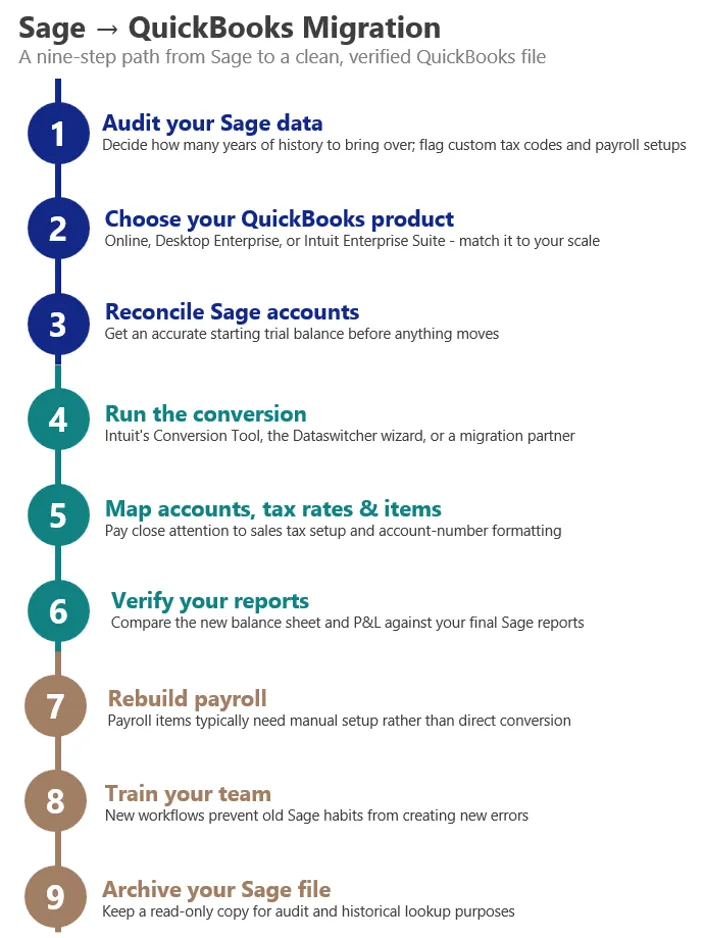
A structured migration process helps prevent accounting discrepancies and reduces the risk of discovering conversion problems after your team starts working in QuickBooks.
- Audit your Sage data: Decide how many years of historical data you need and identify custom tax codes, payroll configurations, inactive accounts, inventory issues, or other records that may require manual attention.
- Choose the right QuickBooks product: Compare QuickBooks Online, QuickBooks Enterprise, and Intuit Enterprise Suite based on users, entities, reporting, inventory, workflows, and future growth.
- Reconcile your Sage accounts: Confirm that bank accounts, credit cards, accounts receivable, accounts payable, and other balance sheet accounts are accurate before conversion.
- Run the conversion: Use the appropriate automated tool, manual import process, or professional migration service.
- Map accounts, tax rates, and items: Review account numbering, product and service lists, inventory records, sales tax settings, and tracking categories.
- Verify financial reports: Compare the post-migration balance sheet and profit and loss statement with your final Sage reports before going live.
- Rebuild payroll as needed: Recreate payroll items and configurations that do not transfer automatically.
- Train your team: Teach users the new workflows, reports, naming conventions, and internal procedures they will use in QuickBooks.
- Archive the Sage file: Keep a secure, read-only backup for audits, historical research, and records that were intentionally excluded from the conversion.
Common Sage to QuickBooks Migration Pitfalls to Avoid
Migrating Before Cleaning the Sage File
Conversion does not fix bad accounting data. Duplicate records, unreconciled balances, outdated accounts, and inconsistent item lists can move into the new system with everything else. Clean the source data first whenever possible.
Skipping Pre-Migration Reconciliation
Your final Sage reports establish the benchmark for validating the QuickBooks conversion. If those reports are already incorrect, it becomes much harder to determine whether a discrepancy was caused by the migration or existed beforehand.
Underestimating Payroll and Sales Tax
Payroll and tax configuration are two areas that frequently require additional setup after migration. Identify those requirements before the conversion so they do not delay payroll processing, invoicing, or your go-live date.
Assuming Every Sage File Uses the Same Conversion Path
Migration requirements can vary by Sage product, Sage version, accounting method, file size, data structure, and target QuickBooks product. Confirm compatibility before choosing an automated conversion method.
Moving Too Much Historical Data
More data is not always better. Old transactions can increase conversion complexity without improving current decision-making. Determine what must remain available inside QuickBooks and what can remain in an archived Sage file.
Not Planning for User Training
A technically successful conversion can still create operational problems if employees do not understand the new workflows. Include training and documented processes in the migration plan, especially for accounting, purchasing, inventory, payroll, and reporting teams.
Sage 50 vs. QuickBooks Online at a Glance
Sage 50 and QuickBooks Online take different approaches to accounting software. The better fit depends on how your business handles access, inventory, integrations, reporting, and accounting complexity.
| Consideration | Sage 50 | QuickBooks Online |
|---|---|---|
| Deployment | Desktop accounting software with connected cloud capabilities | Cloud-based accounting software |
| Learning curve | More traditional accounting-oriented workflow | Designed for broader business-user accessibility |
| Integrations | Third-party integrations available through the Sage ecosystem | Broad ecosystem of connected business applications |
| Inventory | Strong built-in inventory capabilities for many Sage 50 users | Inventory capabilities vary by QuickBooks plan and may require a different QuickBooks product for more complex operations |
| Support ecosystem | Sage partners, consultants, and support resources | Large network of QuickBooks ProAdvisors, consultants, and training providers |
Businesses with complex multi-company accounting, advanced inventory, or ERP-level requirements should avoid choosing a target platform based on familiarity alone. In some cases, QuickBooks Enterprise or Intuit Enterprise Suite may be a better destination than QuickBooks Online.
Sage to QuickBooks Migration FAQs
How long does a Sage to QuickBooks migration take?
Automated file processing can take only a few business days, but the complete project often takes longer. Data cleanup, account mapping, testing, reconciliation, payroll setup, user training, and final validation all affect the migration timeline.
Will I lose historical data when switching from Sage to QuickBooks?
Not necessarily. Core accounting data can often be converted, but some records and configurations may need to be recreated or retained in an archived Sage file. Decide which history must be available inside QuickBooks before the migration begins.
Can a cash-basis Sage 50 company migrate to QuickBooks Online?
Some automated Sage 50 to QuickBooks Online conversion methods support accrual-basis files only. Cash-basis businesses may need a different migration method, such as a manual import or a professionally managed conversion.
Do I need a consultant to migrate from Sage to QuickBooks?
Small, straightforward files may be suitable for a do-it-yourself conversion. Professional help becomes more valuable when you have multiple years of history, complex inventory, payroll, custom tax setups, multiple companies, large data files, or reporting requirements that need to be redesigned in QuickBooks.
Which QuickBooks product should I choose when leaving Sage?
Choose based on your current and future requirements, not only on price or familiarity. Evaluate users, entities, inventory, reporting, integrations, workflow automation, payroll, and growth plans before deciding between QuickBooks Online, QuickBooks Enterprise, or Intuit Enterprise Suite.
Need Help With a Sage to QuickBooks Migration?
A poorly planned accounting migration can create reporting problems, duplicate cleanup work, and unnecessary disruption for your team.
Contact Fourlane to speak with a QuickBooks or ERP expert about your Sage data, migration requirements, and the best target platform for your business.
- Sage data assessment and migration planning
- QuickBooks product selection
- Historical data conversion and cleanup
- Post-conversion validation, training, and support