

For project-based businesses, the enterprise resource planning (ERP) platform you choose can make or break profitability. Comparing Intuit Enterprise Suite vs Acumatica can help you decide on the best option for tracking every hour, allocating costs, and delivering invoices on time. The right system keeps teams focused on building value instead of battling spreadsheets. Miss the mark, and you risk delayed billings, opaque project performance, and margins that quietly erode.
In a recent webinar, our team at Fourlane walked through how Intuit Enterprise Suite (IES) and Acumatica tackle project accounting from two very different angles, exploring everything from dashboard design and estimate-to-actual reporting to the role of automation in reducing manual work. Drawing on those insights, this guide will break down the strengths, limitations and best-fit scenarios for each solution so you can approach your next ERP decision with confidence and clarity.
Understanding Intuit Intuit Enterprise Suite (IES): Project Accounting Features and Limitations
IES is purpose-built for teams that want straightforward visibility into costs, revenue and profitability at the project level. Its home-base is an intuitive dashboard that lets you flip between payroll expenses and hourly costs, compare estimates to actuals and drill into supporting reports with just a click. The result is a clear, at-a-glance snapshot of where each job stands financially – ideal for managers who need fast answers without mastering complex menus.
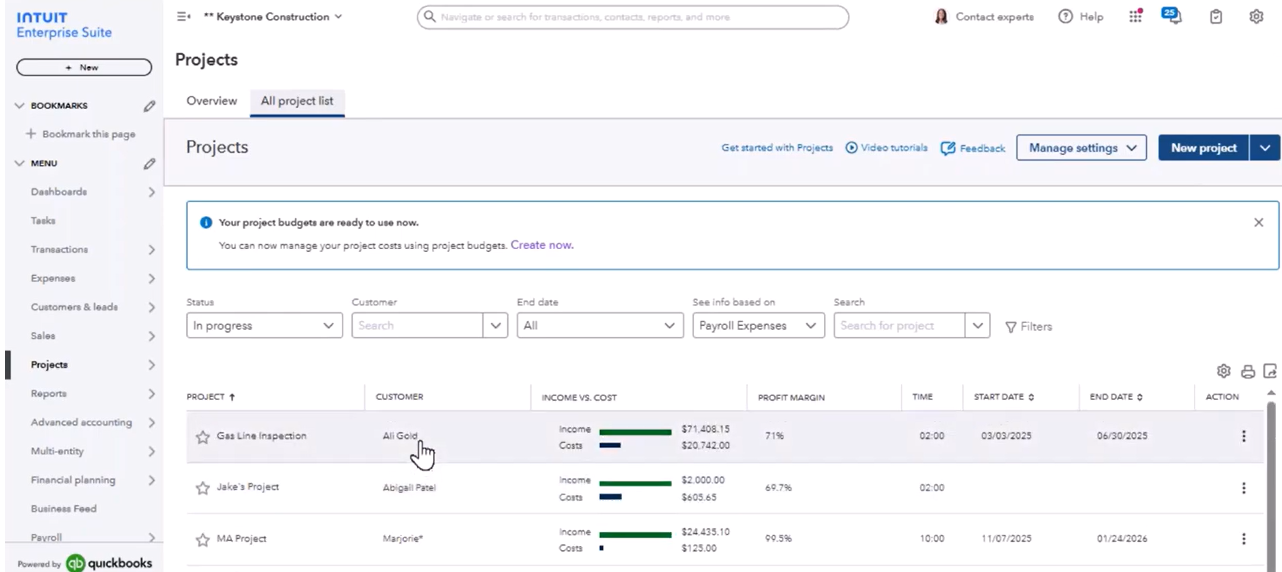
Because many finance teams come to IES from QuickBooks, its budgeting and forecasting tools feel instantly familiar. The software mirrors that well-known interface while layering on project-specific horsepower such as dimensions for cost categories and drag-and-drop task templates – features that simplify day-to-day data entry and speed up new-project setup.
Project progress tracking, however, is still a manual affair. Users must update percentage-complete fields by hand each time they want dashboards or profitability reports to reflect real-time status. For busy project managers juggling multiple jobs, the extra data-entry step can become a bottleneck that delays insights when they matter most.
Before you decide if IES can shoulder your entire project-accounting workload, it pays to weigh its drawbacks alongside its strengths. A few recurring pain points include:
- Task-level details can’t be tagged directly on invoice line items, so finance teams often resort to dimension-based workarounds
- Manual updates are required for completion percentages, increasing the risk of outdated progress indicators
- Limited automation elevates reliance on spreadsheets for reallocations or specialized billing scenarios
- Reporting on granular task performance involves extra configuration, which can slow the month-end close
How IES Handles Project Budgets and Reporting
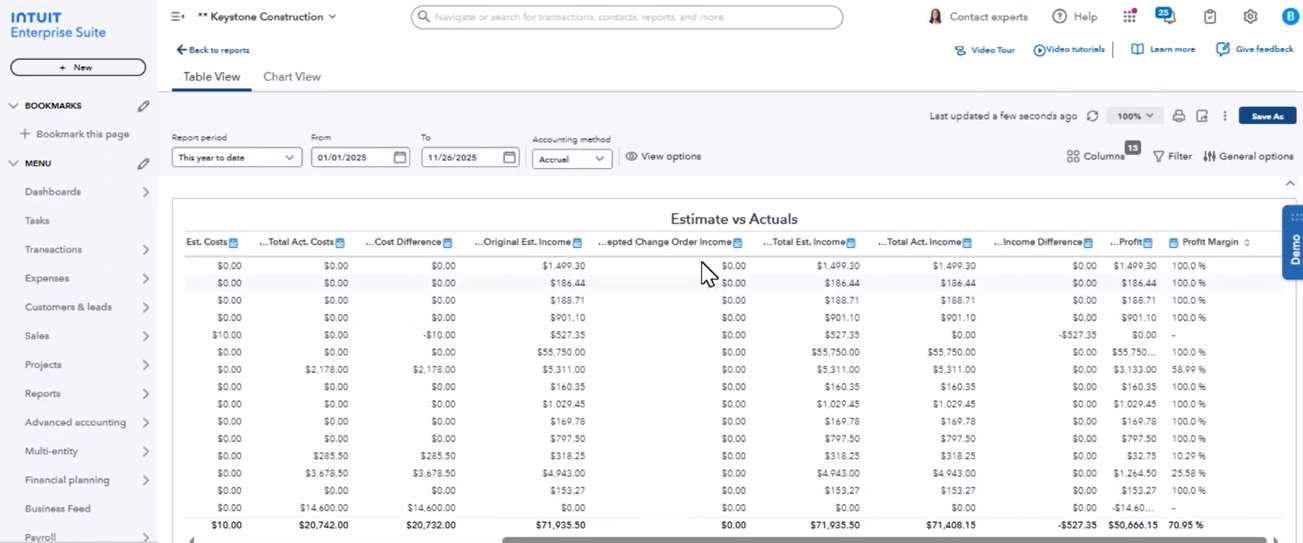
When it comes to budgeting, IES lets you break down costs by dimensions such as concrete, earthwork or utilities, making it easier to compare original estimates against actuals and surface overages early in the project lifecycle. Project managers can create budget templates, reuse common task lists and review estimate-to-actual reports that group data by vendor, cost class or revenue stream – all within a QuickBooks-style layout that shortens the learning curve.
With these capabilities in mind, IES delivers solid baseline functionality for companies that prize familiarity and ease of use. Yet as your operations scale or project complexity grows, you may start looking for deeper automation and more flexible task-level controls – the very areas where next-generation ERPs distinguish themselves.
Exploring Acumatica: Advanced Project Accounting and Automation
Acumatica approaches project accounting with a web-native design and a deep toolkit that caters to complex, multi-layered jobs. As we explain in our recent webinar, Acumatica has more available fields, supports American Institute of Architects (AIA) invoicing, and includes project billing and project allocation rules, giving project teams capabilities that simply don’t exist in many entry-level systems.
Beyond the headline features, users appreciate the freedom to log in from any modern browser, spin up new projects from templates and weave purchasing, time entry and expenses directly into the general ledger without juggling third-party tools or spreadsheets.
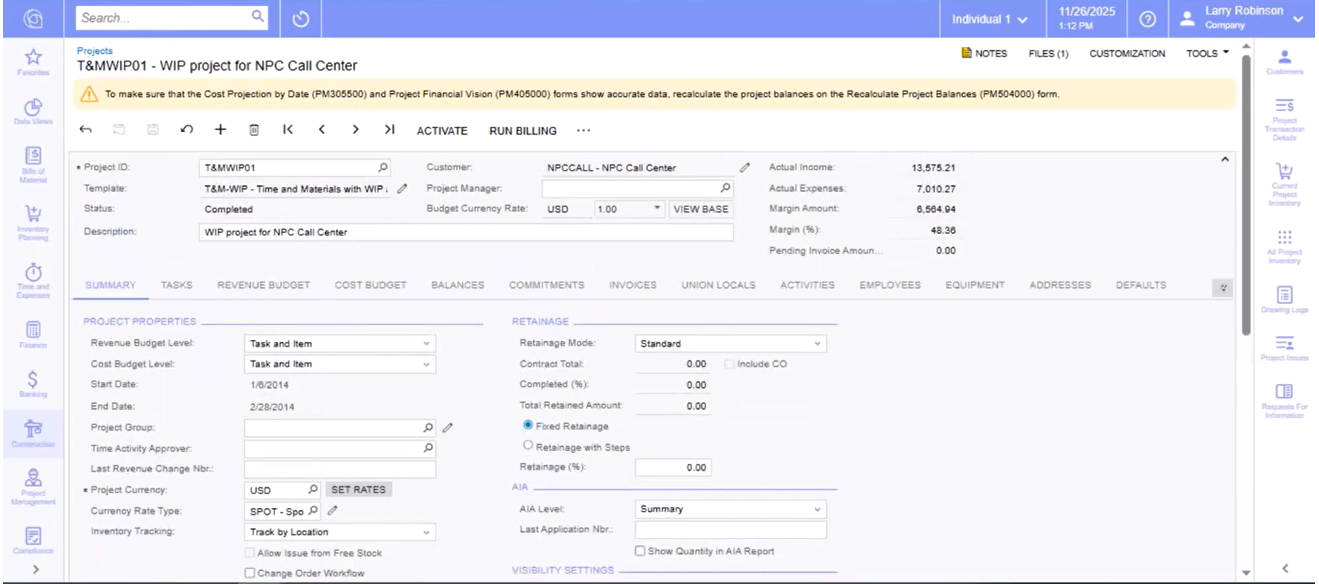
Acumatica’s Advanced Task Structure
Acumatica organizes work at the task level in ways that are particularly powerful for project-based teams:
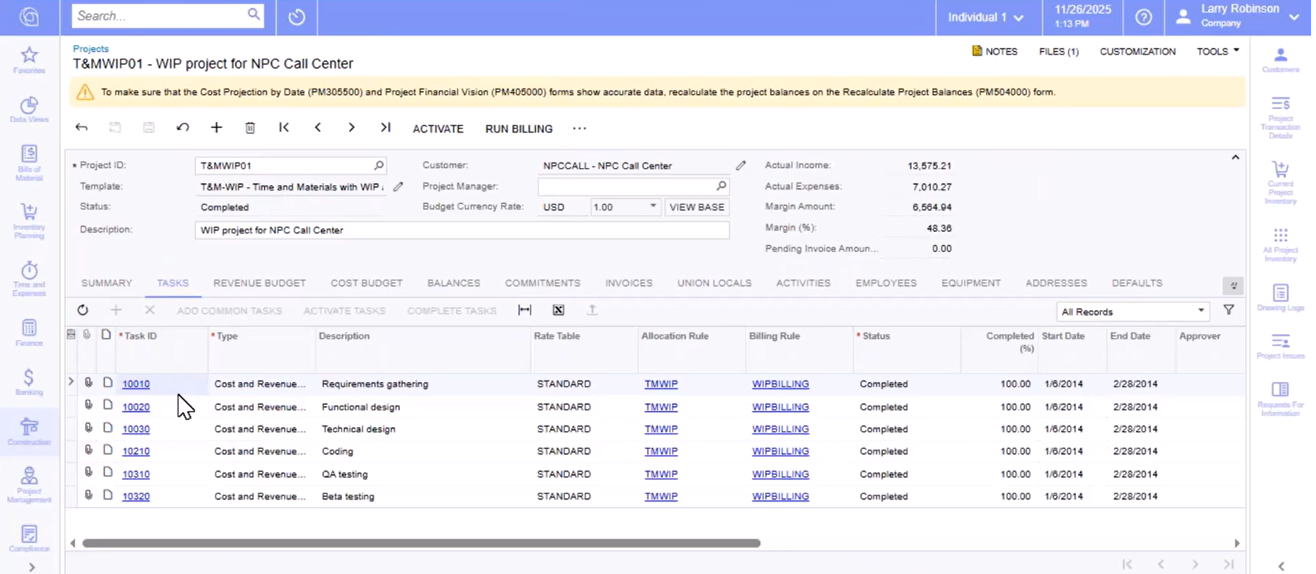
- Each project can be broken down into granular task IDs – think buildings, floors or even phases – while budgets can track dollars at the task, cost-code or inventory-item level, offering flexibility for estimating and cost control
- Tasks inherit their own allocation and billing rules, so the ERP automatically routes labor, equipment or material costs to the right revenue buckets without manual journal entries
- Because general ledger (GL) accounts sit directly on the task record, finance teams avoid the re-keying that often plagues mid-project scope changes
Automation That Shrinks Manual Work
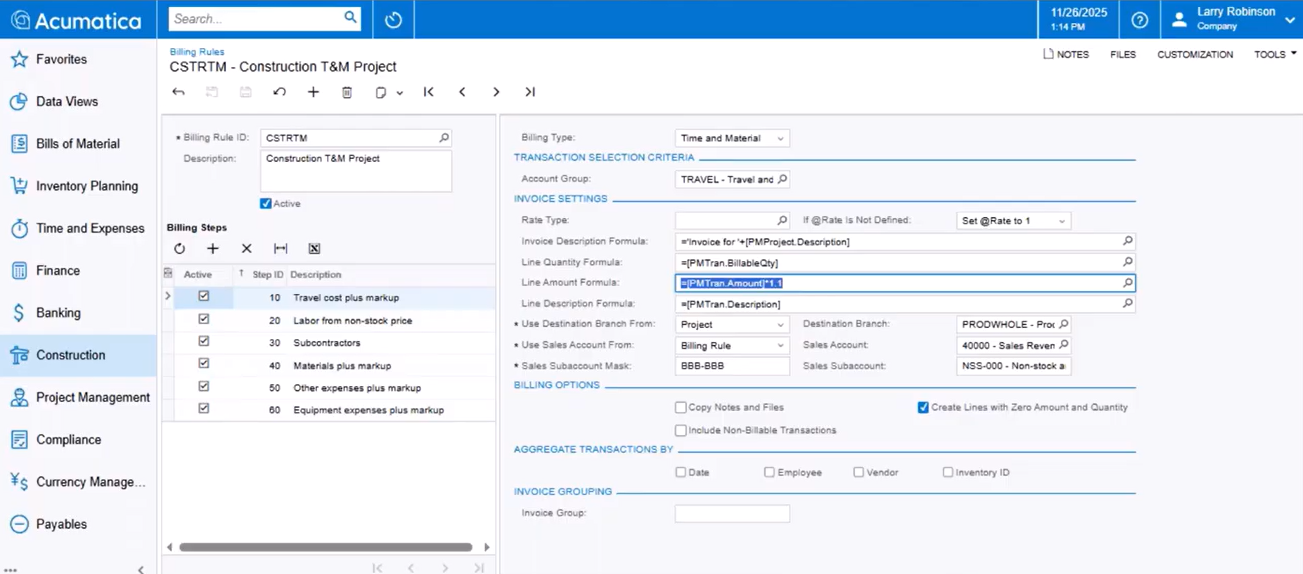
Automation is where Acumatica truly shines. During a live demonstration, our team at Fourlane showed how a billing rule can pull costs from a GL bucket and automatically create an invoice and markup by a predefined percentage – no spreadsheets, formulas or late-night reconciliations required.
Those billing rules pair with allocation rules that can shuttle expenses between buckets at month-end. In one real-world example, a construction client cut its close process from nearly a week to just a few hours after replacing pivot tables with only three automated allocations that run in the background each night, a change described as a major efficiency win.
Taken together, Acumatica’s browser-based access, template-driven setup and automation tools position it as a strong contender for organizations that need more than baseline dashboards and manual updates.
Acumatica’s Edge: Task-Level Tagging and Comprehensive Reporting
While IES relies on dimensions for cost categorization, Acumatica adds subaccounts and allows every transaction to reference the exact project task, making task-level reporting far more straightforward and eliminating the workaround that IES users often deploy for detailed analytics.
With that difference in mind, you can evaluate how each platform stacks up for specific business scenarios and determine which ERP delivers the right balance of simplicity, automation and scalability.
IES vs Acumatica: Which ERP Fits Different Business Scenarios?
IES often shines for organizations that prize straightforward workflows, a familiar QuickBooks-style interface and rapid employee onboarding. If your projects are relatively simple, you run just a handful of active jobs at any one time and you don’t need extensive automation to juggle commitments or complex billing rules, IES provides an approachable, cost-effective path to better project visibility and basic budget control.
By contrast, Acumatica steps forward when projects grow in volume, complexity or compliance requirements. Its automation, task-level controls and browser-based flexibility help finance and operations teams keep pace without adding headcount.
Below are a few common scenarios where Acumatica delivers outsized value:
- Construction firms that rely on built-in AIA invoice schedules, commitments tracking and out-of-the-box Procore integration to streamline pay-application workflows and subcontract management
- Companies running multi-entity or intercompany structures that need allocation rules, subaccounts and advanced templates to keep costs, revenue and eliminations in sync across legal entities
- Project-based manufacturers or professional services groups that require granular task IDs, sophisticated billing markups and automated month-end allocations to shorten close cycles
- Fast-growing startups preparing for rapid scale who want to avoid re-platforming once project counts, data volume or compliance demands outgrow entry-level systems
Ultimately, choosing between these two ERPs comes down to matching capabilities with day-to-day operational reality – and that starts with asking the right questions.
Key Questions to Ask When Choosing Your Project Accounting ERP
- How much manual data entry can your project managers realistically sustain, and where would automation deliver the greatest return?
- Do you need task-level tagging on every transaction, or will dimension-level reporting cover your analytics needs?
- What depth of reporting and real-time visibility is necessary for executives, project managers and field teams to act quickly?
- How often do you invoice, and do you rely on specialized formats (e.g., AIA schedules) or complex markups that must be automated?
- Will your organization add new entities, locations or service lines in the next few years, and can the ERP scale without major reconfiguration?
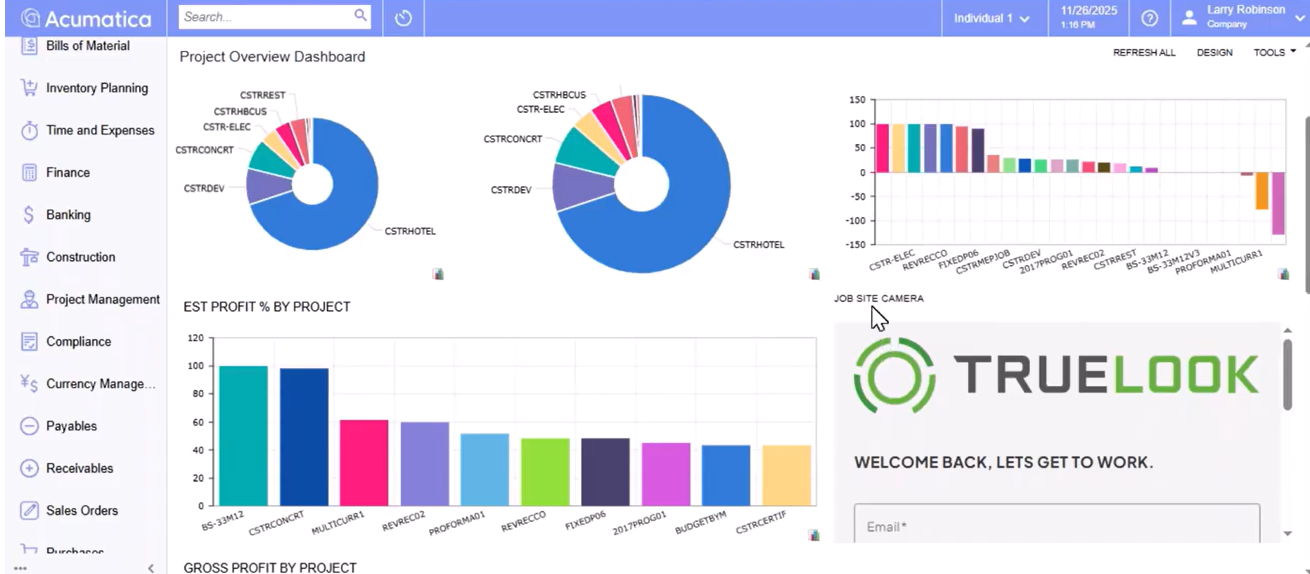
- Which existing systems – such as procurement, payroll or job-site management – must integrate seamlessly with your chosen platform?
By weighing these factors, you can zero in on the platform that aligns with your operational goals, growth roadmap and resource constraints – setting the stage for a successful, long-term ERP partnership.
Empower Your Project Accounting: Find the Right Fit with Expert Guidance
Every project-driven organization balances unique mixes of complexity, compliance and growth ambition. That means the “right” ERP is the one that maps cleanly to your processes today while giving you headroom for tomorrow’s challenges – whether that’s tighter margins, more entities or new billing requirements. IES offers a familiar, streamlined environment for straightforward jobs, while Acumatica delivers the automation and depth that keep large or fast-moving projects on track. The key is recognizing where you sit on that spectrum and selecting a platform that empowers your teams rather than burdens them.
If you’re still weighing options or want a second set of eyes on your requirements, we’re here to help at Fourlane. Contact Fourlane for a personalized ERP consultation or project accounting assessment and take the first step toward a system that fuels accuracy, efficiency and profitable growth.