

Is your financial reporting process simply producing statements, or is it helping you manage the business?
That question separates accounting systems that record history from platforms that drive strategy. For CFOs and finance leaders, the difference between QuickBooks Enterprise and Intuit Enterprise Suite is not just desktop vs. cloud. It is the difference between traditional reporting and modern financial intelligence.
In this guide, we compare QuickBooks Enterprise Desktop and Intuit Enterprise Suite through a CFO lens, focusing on financial reporting, profitability, cash flow, multi-entity visibility, intercompany reconciliation, AI-supported insight, and executive decision-making.
- What Modern CFOs Need from Financial Reporting
- Profitability Reporting
- Cash Flow Forecasting
- The Hidden Cost of Excel Dependency
- Multi-Entity Reporting
- Intercompany Reconciliation
- Executive Visibility
- AI and Automation
- Closing the Books Faster
- Which System Is Right for Your Business?
- Frequently Asked Questions
What Modern CFOs Need from Financial Reporting
Historically, finance teams were measured on accuracy, compliance, and producing month-end financial statements. Those fundamentals still matter, but they are no longer enough.
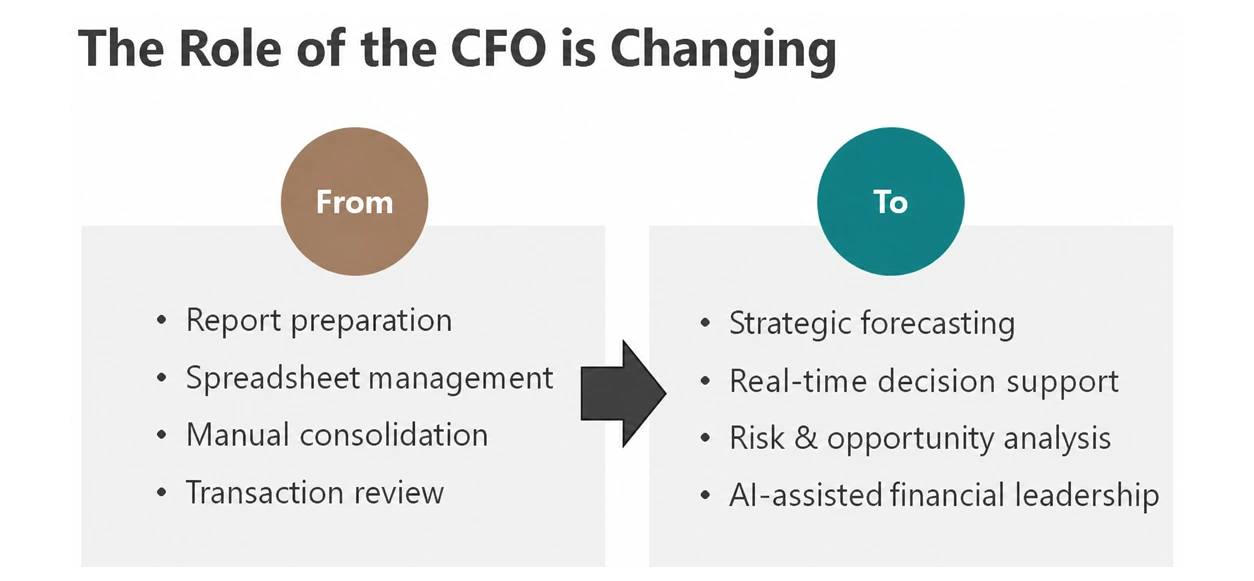
Today’s CFO is expected to deliver:
- Real-time visibility into profitability, cash flow, and department performance
- Strategic forecasting that informs leadership decisions
- Operational insight across multiple entities and business units
- Risk identification before issues impact the business
- Decision support based on current data, not reports that are two or three weeks old
Modern platforms like Intuit Enterprise Suite are evolving reporting beyond static statements into AI-powered financial intelligence. Instead of only producing reports, the system can help surface trends, flag unusual activity, and guide finance teams toward areas that need attention.
The shift is significant. Reporting is no longer just about visibility. It is about intelligence.
Profitability Reporting: Are You Growing Revenue or Growing Margins?
One of the most important CFO questions is also one of the most overlooked: Are we becoming more profitable, or are we just generating more revenue?
In growing businesses, revenue often increases while margins quietly tighten. Labor costs rise, operational complexity expands, intercompany activity grows, and the organization starts working harder without proportional profitability gains.
How QuickBooks Enterprise Handles Profitability Analysis
QuickBooks Enterprise can analyze profitability, but the process is often hands-on. Finance teams typically need to:
- Run multiple versions of the Profit & Loss report
- Customize columns for period comparisons
- Export data to Excel
- Build variance analysis manually
The insight exists, but uncovering it takes work. That work multiplies as the business scales.
How Intuit Enterprise Suite Changes the Workflow
Intuit Enterprise Suite brings consolidated, multi-dimensional reporting directly into the platform. Finance teams can access consolidated reports such as:
- Profit & Loss
- Balance Sheet
- Cash Flow
- Trial Balance
- Accounts Receivable Aging
- Accounts Payable Aging
These reports can be viewed across companies, with filters by entity, shared dimension, and transaction origin. The finance team shifts from building reports to analyzing performance. The conversation changes from “what happened?” to “why is it happening, and what should we do next?”
Real Client Example: Faster Profitability Visibility Across Seven Entities
A fast-growing seven-entity organization was manually pulling trial balances, reconciling intercompany activity, and piecing together reporting. The close process often took weeks.
After moving to Intuit Enterprise Suite with a cleaner structure, consolidated reporting, and automated intercompany workflows, leadership gained immediate visibility into profitability across entities, departments, and projects.
Cash Flow: Reactive Reporting vs. Proactive Insight
Every CFO needs to understand where cash came from and where it went. However, leadership’s bigger question is usually forward-looking.
- Where is cash headed?
- Do we have liquidity for growth?
- Are receivables slowing?
- Are payables creating pressure?
In QuickBooks Desktop, that analysis often moves outside the accounting system. Teams export reports and rebuild forecasts in Excel or a separate planning tool. That creates another workbook, another model, and another version of the truth to maintain.
Intuit Enterprise Suite supports a more forward-looking finance model by combining reporting, consolidated visibility, and AI-supported insight in one environment. Its dashboard includes a built-in 13-week cash flow forecast that lets users drill into money-in and money-out details without leaving the platform.
- QuickBooks Desktop tells you where cash has been.
- Intuit Enterprise Suite helps you understand where cash may be heading.
The Hidden Cost of Excel Dependency in Financial Reporting
Excel is incredibly powerful. Every finance team uses it, and it will always have a place. The problem starts when Excel becomes the reporting system behind the accounting system.
In many QuickBooks Desktop environments, finance teams spend significant time:
- Exporting reports from multiple company files
- Combining spreadsheets
- Updating formulas and validating balances
- Checking links across workbooks
- Reconciling differences manually
- Preparing executive report packages by hand
Over time, this process becomes dependent on individual knowledge. One person knows which tab to update. Another knows which formula refreshes. Someone else knows which entity needs a manual adjustment before the report package goes out.
That is not a reporting process. It is a risk.
Intuit Enterprise Suite reduces this dependency by centralizing consolidated reporting inside the platform. The goal is not to eliminate Excel. The goal is to stop relying on Excel as the core control for financial visibility. Instead of asking “which spreadsheet is correct?” leadership works from a single reporting environment.
Multi-Entity Reporting: The Largest Operational Difference
Multi-entity reporting is where QuickBooks Enterprise Desktop and Intuit Enterprise Suite diverge most dramatically.
Multi-Entity Reporting in QuickBooks Desktop
In QuickBooks Desktop, multi-entity reporting typically means:
- Separate company files
- Separate reporting structures
- Separate logins
- Separate close processes
- Often inconsistent charts of accounts
When leadership requests consolidated visibility, the process becomes manual. Finance teams export reports, combine spreadsheets, create eliminations by hand, validate intercompany balances, reconcile differences, and explain variances.
It works, but it introduces delay, risk, and heavy manual dependency.
Multi-Entity Reporting in Intuit Enterprise Suite
Intuit Enterprise Suite is designed for multi-entity visibility. The platform helps organizations manage multiple entities from a single sign-in, switch entities from a drop-down, view consolidated dashboards, and generate consolidated financial reports.
Real Client Example: One Login for Five Related Entities
A construction company managing five related entities was running separate QuickBooks Desktop files on a local server. The team constantly logged in and out of entities, re-entered information, and manually reconciled cross-company activity.
After moving to Intuit Enterprise Suite, the company gained a unified multi-entity system with a single login and a stronger foundation for consolidated reporting.
Intercompany Reconciliation: A CFO’s Hidden Time Sink
The intercompany conversation is not really about journal entries. It is about reporting integrity.
In many desktop workflows, finance teams spend hours balancing entity activity, reconciling due-to and due-from accounts, validating spreadsheets, and resolving discrepancies during close. These tasks seem operational, but they directly impact reporting speed and leadership confidence.
- Unaligned intercompany balances slow down consolidated reporting
- Manual eliminations create a fragile close process
- Spreadsheet-dependent reconciliation reduces confidence in the numbers
Intuit Enterprise Suite reduces this friction through intercompany workflows, multi-entity reporting, and elimination capabilities. The platform can automatically eliminate selected intercompany accounts from consolidated reports, create intercompany journal entries, and run consolidated multi-entity reports.
In Practice: Intercompany Entries Without Jumping Between Files
When you post a journal entry on one company’s books, the corresponding entry can post automatically on the related entity. That means no jumping between separate files and no manual reverse entries.
When you pull a consolidated Profit & Loss by company, eliminations are calculated for you. The CFO value is not fewer journal entries. It is cleaner reporting alignment and a faster, more confident close.
Executive Visibility: Accounting Data vs. Business Intelligence
This is the philosophical difference between the two platforms.
QuickBooks Enterprise Desktop is a strong accounting system. It is built around entering transactions, maintaining books, and producing financial reports. It does that job well.
Intuit Enterprise Suite extends that foundation into executive visibility and operational insight.
A CFO does not just need a report. A CFO needs to understand what the report means, where numbers are moving, which parts of the business drive performance, and where action is required.
Instead of waiting for manually prepared reports, Intuit Enterprise Suite gives leadership access to:
- KPI scorecards that can be filtered by entity, period, and comparison
- Trend indicators with visual cues
- Consolidated results across entities
- 13-week cash visibility
- Drill-down reporting with dimensional analysis
One client needed visibility not just by entity, but across departments, projects, and service lines. Their issue was not a lack of data. It was the inability to turn disconnected data into meaningful reporting. After centralizing in Intuit Enterprise Suite, leadership gained consolidated, investor-ready reporting with insight into profitability across every dimension of the business.
AI and Automation: The Future of Financial Operations
AI-assisted financial systems are changing how finance teams identify issues, validate data, and manage exceptions. Instead of manually hunting for problems after the fact, finance teams can use system-supported insights to focus attention where it matters most.
The Intuit Enterprise Suite AI agent is not only about automating data entry. It is about helping finance teams operate more intelligently.
The system supports:
- AI-assisted setup: Recommendations around chart of accounts, dimensions, and vendor cleanup
- Anomaly detection: For example, flagging duplicate or inconsistent account names
- Performance overviews: Real-time analysis of transactional activity, not just month-end batches
- Highlight drill-downs: Explanations of why a metric changed and what may have caused the movement
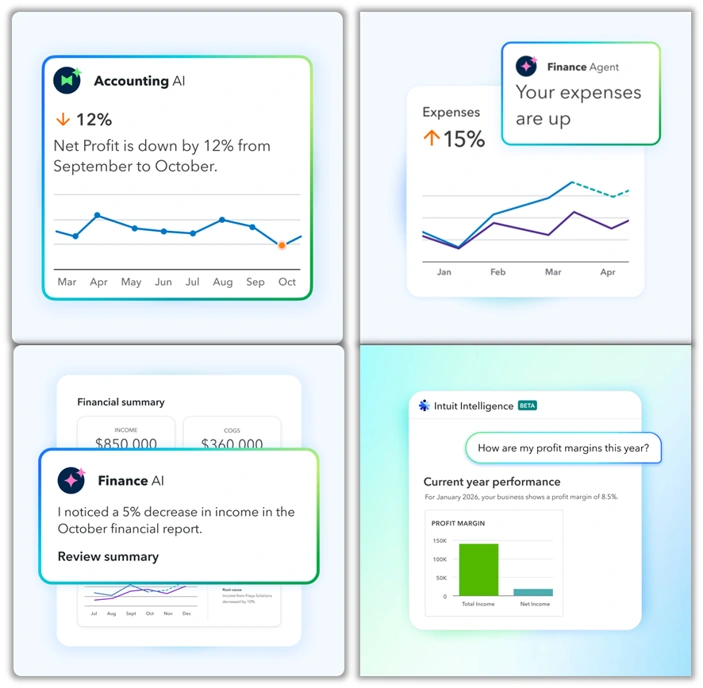
The strategic shift is significant. Instead of finance teams hunting for problems, the system surfaces where attention should focus. This is exception-based management. The system gets finance teams to the right judgment faster. It does not replace judgment. It accelerates it.
Closing the Books Faster
Month-end close is where CFOs feel operational differences most clearly.
In QuickBooks Desktop environments, the close can consume days. Teams export reports, reconcile balances, validate spreadsheets, consolidate data manually, and assemble executive packages. While the finance team works, leadership waits.
Intuit Enterprise Suite compresses this workflow by building consolidated reporting, intercompany visibility, dashboards, and alignment directly into the platform. Review is still essential, but the team spends less time assembling data and more time analyzing it.
The biggest gain is not just efficiency. It is decision speed.
Traditional Finance vs. Modern Finance
The difference between QuickBooks Enterprise Desktop and Intuit Enterprise Suite is not simply older technology vs. newer technology. It is the difference between traditional finance operations and modern financial management.
| Traditional Finance | Modern Finance |
|---|---|
| Manual reporting | Intelligent financial operations |
| Backward-looking statements | Forward-looking insights |
| Spreadsheet-dependent reporting | System-supported visibility |
| Reactive issue-finding | Proactive AI-assisted anomaly detection |
| Days to consolidate | Real-time consolidated dashboards |
When the system supports consolidated reporting, automation, AI-assisted insight, and executive visibility, finance becomes a strategic partner to the business, not just a function that reports on it.
Which System Is Right for Your Business?
Both platforms are capable. QuickBooks Enterprise Desktop has supported years of reliable accounting operations for many businesses and remains a strong fit for single-entity organizations with stable reporting needs.
Intuit Enterprise Suite is built for organizations that need:
- Multi-entity visibility and consolidated reporting
- Real-time executive dashboards and KPIs
- AI-assisted insights and exception-based management
- Reduced Excel dependency in financial workflows
- A foundation for investor-ready reporting and strategic financial management
Across every client situation Fourlane sees, the issue is not really software. It is alignment between the financial system and how the business actually operates.
Sometimes the system is too limited for growth. Sometimes the environment is too fragmented across entities. Sometimes a tool is too complex for where the business has evolved.
The goal is always the same: build a financial environment that supports visibility, reduces friction, and gives leadership confidence in the numbers. When that alignment improves, reporting becomes faster, visibility becomes clearer, decision-making becomes stronger, and finance becomes a strategic driver of the business.
Frequently Asked Questions
What is Intuit Enterprise Suite?
Intuit Enterprise Suite is Intuit’s modern ERP platform designed for multi-entity organizations. It supports AI-powered insights, consolidated reporting, planning, and enterprise-grade financial controls in a cloud environment.
How is Intuit Enterprise Suite different from QuickBooks Enterprise Desktop?
QuickBooks Enterprise Desktop is an accounting system focused on transaction recording and standard financial reporting. Intuit Enterprise Suite extends into multi-entity consolidation, automated intercompany workflows, real-time dashboards, and AI-assisted financial analysis.
Does Intuit Enterprise Suite replace Excel?
No. Intuit Enterprise Suite reduces dependency on Excel as the core reporting control by centralizing consolidated reporting inside the platform. Excel remains valuable for ad hoc analysis, but it should not be the source of truth for executive reporting.
Is Intuit Enterprise Suite a good fit for businesses with multiple entities?
Yes. Organizations managing multiple entities, departments, projects, or service lines typically gain the most from Intuit Enterprise Suite because of its single sign-in, consolidated reporting, and automated intercompany capabilities.
How does Intuit Enterprise Suite support CFOs strategically?
Intuit Enterprise Suite supports CFOs by delivering real-time consolidated visibility, AI-surfaced anomalies, forward-looking cash flow forecasting, and exception-based reporting. This helps finance leaders move from preparing reports to driving strategic decisions.
Need Help Comparing QuickBooks Enterprise and Intuit Enterprise Suite?
The right accounting system should support how your business actually operates today and where it is headed next.
Take the Intuit Enterprise Suite fit assessment to speak with a QuickBooks and ERP expert about your reporting needs, multi-entity structure, and finance workflow.
- QuickBooks Enterprise and Intuit Enterprise Suite comparison guidance
- Multi-entity reporting and consolidation planning
- Intercompany workflow and close process review
- Implementation, migration, reporting, and training support