

Overview
A single journal entry can feel like the fastest way to fix messy books in QuickBooks Enterprise – but one wrong move can quietly break your financial reporting. The biggest mistake I see people make is using journal entries to clean up sales or accounts payable. The same risk applies to inventory because reporting links break when control accounts are edited directly. By understanding when to rely on journal entries and when to choose another transaction, you’ll keep financial statements accurate and close on schedule.
If you’ve ever asked, “When should I use a journal entry in QuickBooks?”, this guide will give you a clear, practical answer. It is based on insights from my recent training session which you view at https://www.youtube.com/watch?v=JswPmDRHKDE.
In this blog post, you’ll learn:
- What journal entries do in QuickBooks
- When to use journal entries
- When not to use them
- How to avoid breaking your reports
- Best practices for clean, audit-ready books
What Is a Journal Entry in QuickBooks?
A journal entry in QuickBooks is a manual transaction that posts directly to the general ledger, bypassing standard forms like invoices, bills, or payments.
Every journal entry must include:
- A debit
- A credit
- Equal amounts on both sides
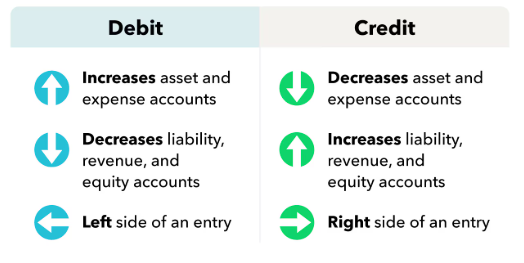
Because journal entries go straight to the ledger, they immediately impact your balance sheet and profit & loss statement.
Unlike everyday transactions, journal entries are designed for:
- Adjustments
- Corrections
- Period-end accounting
Why Journal Entries Are Powerful (and Risky)
Journal entries are powerful because they:
- Move entire balances quickly
- Avoid editing multiple transactions
- Enable advanced accounting adjustments
But they’re risky because they can:
- Break connections between reports
- Cause discrepancies in subledgers
- Create audit issues
For example, posting directly to Accounts Receivable or Inventory can disconnect supporting reports from your balance sheet.
When to Use Journal Entries in QuickBooks
Journal entries are best used for high-level financial adjustments, especially at period-end.
When NOT to Use Journal Entries in QuickBooks
This is where most mistakes happen.
Why Misusing Journal Entries Breaks Reports
QuickBooks relies on connections between:
- Control accounts (balance sheet)
- Supporting reports (subledgers)
Journal entries bypass these connections. That means:
- Reports stop tying out
- Audits become difficult
- Financial accuracy is compromised
As a best practice: Your financial statements should always tie to supporting reports.
Simple Rule: When Should You Use a Journal Entry?
Here’s the easiest way to decide:
- If QuickBooks has a built-in form for it, use that.
- If it doesn’t, use a journal entry.
How to Create a Journal Entry (Best Practices)
When you do use a journal entry, follow these best practices:
- Use the Correct Date
-
- Monthly entries → last day of the month
- Year-end entries → fiscal year-end
- Use Clear Naming Conventions
-
- Example: JE-2025-12 or DEP-01-2026
- Balance Debits and Credits
-
- Always verify totals before saving
- Write Detailed Memos
Include:
-
-
-
- Why the entry exists
- What it adjusts
- How amounts were calculated
-
-
There’s no such thing as too much detail.
Automating Journal Entries (Save Time)
Recurring entries like depreciation and prepaid expenses can be automated using QuickBooks memorized transactions.
This helps:
- Reduce manual work
- Ensure consistency
- Speed up month-end close
Reversing Entries for Accruals
For accruals, always use a reversal:
- Record the expense in the current period
- Reverse it on the first day of the next period
- Enter the actual bill when received
This prevents duplicate expenses and keeps reporting accurate.
Final Thoughts: Mastering Journal Entries in QuickBooks
Journal entries are a high-impact tool – but only when used correctly.
| Use Them For: ✔ Accruals | Avoid Them For: ✘ Customer transactions
|
The safest strategy:
- Use journal entries for ledger-level adjustments
- Use QuickBooks forms for day-to-day transactions
Need Help Fixing or Cleaning Up Your QuickBooks?
If you’re unsure when to use journal entries or worried your reports don’t tie out, you’re not alone. Misused journal entries can quietly break your financials and create bigger problems at month-end or during an audit.
Contact Fourlane to work with a QuickBooks expert who can help you clean up your books, fix reporting issues, and implement the right workflows moving forward.
- Clean up messy or inaccurate QuickBooks files
- Fix broken reports caused by improper journal entries
- Set up best-practice workflows for AR, AP, and inventory
- Train your team to use QuickBooks the right way